Google Business Profile video verification is one of the verification methods Google may provide when you need to confirm that your business is real, operating as described, and managed by an authorized person. In 2026, Google continues to use video verification for eligible storefront, hybrid, and Service Area Businesses when this option is available on the profile.
If you are searching for Google Business Profile video verification requirements, this guide explains exactly what to prepare, what your video should show, how the verification process works, what storefront and Service Area Businesses need to demonstrate, why videos are rejected, and how to prepare a stronger verification recording.
You may also find searches such as Google Business Profile video verification requirements, Google video verification requirements, GBP video verification, and Google Business Profile verification video. The important point is that requirements can change over time, so businesses should follow the current instructions shown in their Business Profile rather than relying on an older checklist.
🚀 Need Help With Google Business Profile Verification?
If your Google Business Profile requires video verification, has failed verification, needs additional verification evidence, or you are dealing with a Service Area Business verification issue, our team can help you understand the verification requirements and prepare your profile correctly. We have successfully assisted 10,000+ businesses worldwide with Google Business Profile verification and suspension-related issues.
What Is Google Business Profile Video Verification?
Google Business Profile video verification is a verification process in which a business records and submits a video showing evidence that connects the business to its location, operations, and management. Google uses the information shown in the recording to help confirm that the person managing the profile actually represents the business.
The process is different from simply uploading a promotional business video. A verification video is specifically designed to demonstrate your business's real-world presence and your connection to it.
Google currently states that the video must be an unedited, unique, continuous recording with no breaks and must be at least 30 seconds long. It also needs to be recorded and uploaded from a mobile device through the Business Profile. Pre-recorded videos are not accepted as a substitute for the required live recording process.
Why Does Google Require Video Verification?
Google Business Profile verification helps protect the accuracy of information shown in Google Search and Google Maps. Verification helps establish that a business exists and that the person controlling the profile is authorized to represent it.
Video verification can be particularly useful when Google needs stronger evidence than the information already associated with a profile. Instead of relying only on a phone number, email address, or business information, the video can demonstrate physical surroundings, business equipment, signage, operational areas, and evidence of management.
The exact verification method is determined automatically by Google. Businesses cannot simply choose any verification method they want. Available options can depend on factors such as business type, public information, region, and other profile signals.
Google Business Profile Video Verification Requirements In 2026
Understanding the current requirements before recording is important because a missing piece of evidence can result in a failed verification attempt. Your recording should be planned around the type of business you operate and the evidence Google asks you to provide.
- Minimum duration: The video must be at least 30 seconds long.
- Continuous recording: The recording should be one complete video without breaks.
- Unedited footage: Do not use edited clips, cuts, or assembled footage.
- Unique recording: Record the verification video specifically for the verification process.
- Mobile recording: Record and upload the video through your Business Profile using a mobile device.
- Location evidence: Show evidence that connects your business with its listed location when applicable.
- Business evidence: Show your storefront, equipment, tools, products, workspace, or other relevant business assets.
- Management evidence: Show evidence that you manage or represent the business.
- Privacy protection: Do not expose sensitive information, private information, or other people's faces.
These requirements should be treated as a preparation checklist rather than a guarantee of approval. Google reviews the evidence shown in the video and may request another recording if the submitted video does not sufficiently demonstrate the required information.
How Long Should A Google Business Profile Verification Video Be?
A Google Business Profile verification video must be at least 30 seconds long. However, the objective should not be to record exactly 30 seconds if doing so prevents you from clearly showing the required evidence.
A practical recording should take enough time to demonstrate the required location, business operations, and management evidence without unnecessary footage. The video should remain continuous and unedited from beginning to end.
Avoid adding an introduction, music, transitions, graphics, or edited sections. The purpose of the recording is to provide authentic evidence rather than create a marketing presentation.
What Should You Show In A Google Business Profile Verification Video?
The evidence you should show depends on your business type. Google distinguishes between businesses with a physical storefront, hybrid businesses, and Service Area Businesses. Preparing the correct evidence for your business model is one of the most important parts of successful video verification.
1. Show Your Business Location
Your recording should help establish where the business operates. Depending on your business type, this can include street signs, building numbers, nearby businesses, recognizable landmarks, or other location indicators.
The purpose is to make the location understandable and connect the real-world surroundings with the location associated with your Google Business Profile.
2. Show Proof That The Business Exists
A physical business can show its storefront, showroom, permanent signage, products, equipment, or other visible evidence of actual business operations.
If your business has permanent signage, make sure the business name is clearly visible. The name shown on permanent business signage should correspond with the business information represented on your profile.
3. Show Proof That You Manage The Business
Google may need evidence that you are authorized to operate or represent the business. Examples can include opening a cash register, accessing an employee-only area, using a point-of-sale system, entering a storage area, opening a business facility, or demonstrating access to business-only equipment.
Do not reveal sensitive financial, identification, tax, banking, or private information while demonstrating management access.
Google Video Verification Requirements For Storefront Businesses
A storefront business normally interacts with customers at a physical location during its operating hours and has permanent on-site signage. If your business fits this model, the video should provide evidence of the location, the business itself, and your ability to manage it.
Start by showing the surrounding area. Street signs, building numbers, nearby businesses, or recognizable landmarks can help establish the location. Then show the storefront or permanent signage where the business name is visible.
After establishing the location and business, demonstrate access to something that normally only an owner, employee, or authorized representative can access. This could include a point-of-sale system, cash register, storage area, kitchen, office, or another business-only area.
A storefront verification video should therefore tell a simple visual story: this is the location, this is the business, and this is evidence that I manage or represent it.
Google Video Verification Requirements For Hybrid Businesses
A hybrid business serves customers at its business location and may also travel to customers or deliver services. For example, a restaurant that has a physical location and also provides delivery services may operate as a hybrid business.
For hybrid businesses, the verification video should demonstrate the physical business location and relevant evidence of business operations. Showing permanent signage, the surrounding area, products, equipment, workspace, or operational areas can help establish the connection between the profile and the real business.
The key is to avoid recording only generic surroundings. Your video should provide specific evidence that identifies the business and demonstrates that it operates at the location represented by the profile.
Google Video Verification Requirements For Service Area Businesses
A Service Area Business is different from a storefront because it provides services to customers without serving them at its listed business address. Examples can include plumbers, locksmiths, electricians, cleaners, mobile repair services, and similar businesses.
Service Area Businesses should not present a residential or business address as a customer storefront when customers do not actually visit that location. Instead, the video should demonstrate where the business operates and provide evidence of the business's actual operations.
Useful evidence can include professional tools, equipment, branded vehicles, products, workspaces, business cards, branded clothing, or other materials associated with the business.
Google also allows relevant business documents to be shown as evidence in appropriate circumstances. Examples can include a business permit, invoice, or utility bill that corresponds with the business name. Never expose sensitive information that is not necessary for verification.
How To Record A Google Business Profile Verification Video
Before recording, plan the route and evidence you want to show. Avoid starting the camera without knowing what information needs to appear because you may finish the recording and discover that an important requirement was missing.
- Sign in to the correct Google Account: Make sure the account has access to the Business Profile that requires verification.
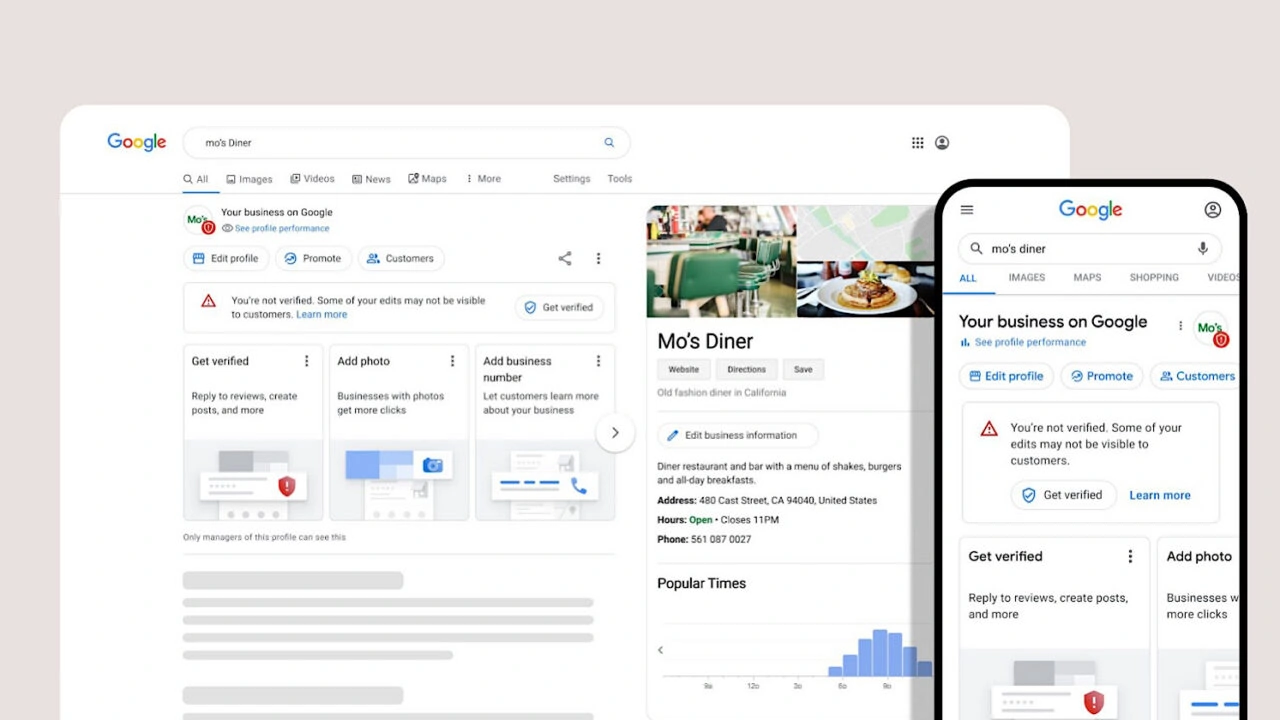
- Open your Business Profile: Find your business on Google Search or access it through the Business Profile interface.
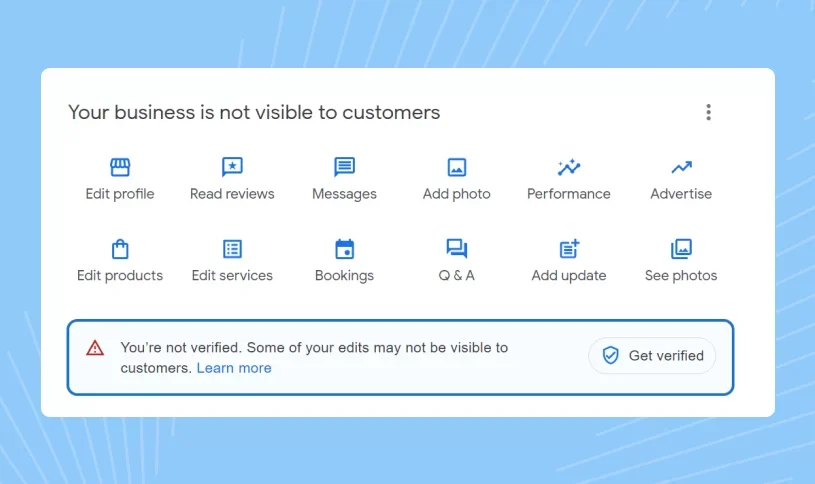
- Select Get Verified: Use the verification option displayed by Google for your profile.
- Select Business Video when available: If Google provides video verification, follow the instructions displayed on the screen.
- Allow required device permissions: Your device may request access to location, camera, and microphone.
- Start recording: Record one continuous, unedited video and show the evidence required for your business type.
- Review the recording: Make sure the location, business evidence, and management evidence are visible.
- Upload the video: Submit the recording through your Business Profile.
How To Prepare Before Google Business Profile Video Verification
Preparation can make the process considerably easier. Instead of trying to remember every requirement while recording, create a short checklist before you start.
- Confirm that you are using the correct Google Account.
- Check that your Business Profile information is accurate.
- Make sure your business name is visible where applicable.
- Identify street signs, building numbers, or nearby landmarks.
- Prepare relevant tools, equipment, products, or business materials.
- Prepare safe evidence of management access.
- Remove confidential information from anything you plan to show.
- Make sure your mobile device has enough battery and storage.
- Confirm that your camera and location permissions are available.
- Plan one continuous recording without cuts or editing.
What Not To Show In A Google Business Profile Verification Video
Verification evidence should demonstrate your business without exposing information that Google does not need to verify the profile. Protecting privacy is especially important when recording inside an office, home, shop, or workplace.
- Bank account numbers.
- Tax identification numbers.
- Government identification numbers.
- Private personal information.
- Sensitive customer information.
- Other people's faces.
- Unnecessary confidential business records.
- Unrelated private documents.
If a document is useful as business evidence, show only the relevant information needed to establish the business connection and avoid exposing unnecessary sensitive details.
Common Google Business Profile Video Verification Mistakes
Many verification problems occur because the video does not clearly demonstrate the relationship between the business, its location, and the person managing the profile. Avoiding common mistakes can make the recording more complete.
Recording A Pre-Recorded Video
Google requires the verification recording to be captured through the verification process. A previously recorded promotional video or an edited business video should not be used as the verification recording.
Editing The Video
Do not combine multiple clips or use transitions. The verification video should be one continuous recording without breaks.
Showing Only The Business Logo
A logo by itself may not establish the required location and management evidence. Where appropriate, show the surrounding location, permanent signage, business operations, and authorized access.
Showing The Wrong Location
If the surroundings do not correspond with the location associated with your profile, Google may not have enough evidence to establish that the business operates where claimed.
Failing To Show Management Evidence
Showing a storefront does not necessarily demonstrate that the person submitting the video manages the business. Include appropriate evidence of authorized access or management.
Why Does Google Business Profile Video Verification Fail?
A verification video can be rejected when it does not contain all the information required for the business type. Google may provide a Review issues notification explaining what was missing from the recording.
Common problems can include a business name that is not visible on the storefront, missing nearby location information, insufficient proof of business operations, or inadequate evidence that the person submitting the video is authorized to manage the business.
If your video is rejected, do not simply submit the same recording again. Review the specific issue identified by Google and create a new continuous recording that includes the missing evidence.
What To Do If Google Rejects Your Verification Video
If Google does not accept your video, open your Business Profile and review the verification issue. The instructions may identify information that was missing or unclear.
- Open your Google Business Profile.
- Look for the verification or review issue notification.
- Read the reason your previous video was not accepted.
- Identify the missing location, business, or management evidence.
- Record a new continuous video.
- Include the evidence from the first recording plus the missing information.
- Upload the new recording through your Business Profile.
If another verification method is available, Google may allow you to use the method shown in your Business Profile. Verification options are determined by Google and are not necessarily available to every business.
How Long Does Google Business Profile Video Verification Take?
After you upload your verification video, Google reviews the submitted information. Current Google guidance states that video verification review can take up to five working days.
This does not mean every verification will take five working days. Some profiles may be processed sooner, while reviews can occasionally take longer depending on the circumstances. If Google requests another video, the review timeline can also extend because another recording needs to be submitted and reviewed.
Can An Online-Only Business Use Google Business Profile Video Verification?
An online-only business that does not provide in-person services is generally not eligible for a Google Business Profile. Google Business Profiles are designed for eligible businesses that have an appropriate real-world customer interaction or service presence.
Having a website, online store, social media account, or virtual presence alone does not create eligibility for a Business Profile. If your company operates entirely online and does not provide in-person services, video verification is not a way to establish eligibility.
Can A Home-Based Service Area Business Complete Video Verification?
A home-based Service Area Business may still be able to complete video verification when it is otherwise eligible for a Business Profile. The recording should focus on legitimate evidence of the business and its operations rather than presenting a private residence as a customer-facing storefront when customers do not visit there.
Depending on the circumstances, useful evidence can include nearby location identifiers, professional tools, branded equipment, a business vehicle, workspace, business materials, or appropriate documents connected to the business.
Google Business Profile Video Verification For Businesses Without A Storefront
Not having a traditional storefront does not automatically mean that a legitimate Service Area Business cannot use video verification. The important distinction is between a business that genuinely operates as a service business and an online-only business with no eligible in-person service activity.
Service businesses should focus their recording on evidence that demonstrates what they do, what tools or equipment they use, where they operate, and how they are authorized to manage the business profile.
This is why businesses should not copy a storefront verification checklist when their actual business model is a Service Area Business. The evidence should accurately represent the way the business operates.
Google Business Profile Video Verification And Live Video Verification
Google can provide different verification options depending on the Business Profile. Video recording verification involves submitting a continuous recording through the profile, while live video verification involves communicating with a Google representative through a live video process when that option is available.
Live video verification is not available to every business. If it appears as an option, Google may require you to be physically present at the business location and demonstrate location and management evidence during the call.
If video recording is available, prepare your evidence before starting. If live video is offered instead, make sure you are at the appropriate location and have the necessary business evidence ready.
Google Business Profile Video Verification Checklist
| Requirement | What To Check |
|---|---|
| Video Duration | Make sure the recording is at least 30 seconds long. |
| Continuous Recording | Record one complete video without cuts, breaks, or edited sections. |
| Location Evidence | Show street signs, building numbers, nearby businesses, landmarks, or relevant location identifiers. |
| Business Evidence | Show signage, products, equipment, tools, workspace, or other relevant evidence of business operations. |
| Management Evidence | Show appropriate evidence that you manage or represent the business. |
| Privacy | Do not expose sensitive information, private information, or other people's faces. |
| Mobile Recording | Record and upload the verification video through your Business Profile using a mobile device. |
| Business Type | Use evidence appropriate for a storefront, hybrid, or Service Area Business. |
🚀 Need Help With Google Business Profile Verification?
If your Google Business Profile requires video verification, has failed verification, needs additional verification evidence, or you are dealing with a Service Area Business verification issue, our team can help you understand the verification requirements and prepare your profile correctly. We have successfully assisted 10,000+ businesses worldwide with Google Business Profile verification and suspension-related issues.
How To Improve Your Chances Of Successful Video Verification
No checklist can guarantee approval because Google determines verification eligibility and reviews the evidence submitted for each profile. However, careful preparation can help you avoid preventable mistakes.
- Use the correct Google Account associated with the profile.
- Check your business information before recording.
- Plan the entire video route in advance.
- Show clear location evidence where required.
- Show authentic business operations.
- Demonstrate authorized management access.
- Keep the video continuous and unedited.
- Record at least 30 seconds.
- Avoid unnecessary private or sensitive information.
- Review Google's feedback carefully if the first video fails.
How Video Verification Fits Into A Complete Google Business Profile Strategy
Verification is an important foundation, but it is not the same as profile optimization. After your Business Profile is verified, your business should still maintain accurate business information, relevant categories, services, operating hours, photos, customer reviews, and other profile details.
If you need to create a new profile, you can also learn more about Google Business Profile creation. Businesses that need profile improvements can review our Google Business Profile optimization service.
If you operate as a Service Area Business, see our guide to Service Area Google Business Profile verification for information specific to service-based businesses.
For a broader explanation of the verification process, visit our guide on how to verify a Google Business Profile. If you are specifically interested in other verification options, you can also read our guide on how to do Google Business Profile video verification.
If you are waiting for verification or want to understand the process timeline, our guide on how long Google Business Profile verification takes can provide additional information.
You can also learn how to check Google Business verification status and how to determine whether your Google Business Profile is live after verification.
Google Business Profile Video Verification In 2026: What Businesses Should Remember
The most important point about Google Business Profile video verification requirements 2026 is that businesses should follow the instructions currently displayed by Google rather than relying on old screenshots, outdated tutorials, or requirements published several years ago.
Searches for Google Business Profile video verification requirements are still common because older guides continue to appear in search results. However, verification procedures can change, so an older article should not automatically be treated as the current standard.
For the current process, focus on the fundamentals: record a unique and unedited continuous video of at least 30 seconds, use a mobile device through your Business Profile, demonstrate the evidence appropriate to your business type, protect sensitive information, and follow any additional instructions Google provides during verification.
Frequently Asked Questions About Google Business Profile Video Verification
1. What are the Google Business Profile video verification requirements?
The current requirements include a unique, unedited, continuous recording of at least 30 seconds. The video should be recorded and uploaded from a mobile device through your Business Profile and should demonstrate the location, business operations, and management evidence appropriate to your business type.
2. How long does a Google Business Profile verification video need to be?
Google currently requires the video to be at least 30 seconds long. The recording should be long enough to clearly show the required evidence while remaining one continuous, unedited video.
3. Can I upload an old video for Google Business Profile verification?
No. Google requires the verification video to be a unique recording captured for the verification process. A previously recorded promotional or verification video should not be used as a substitute.
4. Can I edit my Google Business Profile verification video?
The verification video should be unedited and continuous. Do not add cuts, transitions, or combine multiple video clips into one verification recording.
5. What should a storefront business show in the verification video?
A storefront business should generally show location evidence, the storefront or permanent business signage, and proof that the person recording the video manages or represents the business.
6. What should a Service Area Business show during video verification?
A Service Area Business can show relevant location identifiers, professional tools, equipment, products, workspace, branded materials, vehicles, and appropriate evidence that demonstrates the business exists and is managed by the person submitting the verification.
7. Can a home-based business complete Google video verification?
An eligible home-based Service Area Business may be able to verify its Business Profile. The video should demonstrate legitimate business operations and should not present a private residence as a customer-facing storefront if customers do not visit that address.
8. How long does Google take to review a video verification?
Google states that video verification review can take up to five working days. Some verification reviews may be completed sooner, while additional review or a new video can extend the process.
9. Why did Google reject my verification video?
A video can be rejected when required evidence is missing or unclear. Examples can include missing business signage, insufficient location evidence, or inadequate proof that you are authorized to manage the business.
10. What should I do if my Google verification video is rejected?
Review the “Review issues” information in your Business Profile, identify what was missing, and record a new continuous video that includes the required evidence plus the missing information.
11. Can I use Google Meet for Google Business Profile verification?
Google may offer live video verification to eligible businesses. Availability depends on the options Google provides for the individual profile. When live video is available, the business representative may need to show the location and management evidence during the live process.
For more information, see our guide: Can You Use Google Meet For Google Business Verification?
12. Can an online-only business get Google Business Profile verification?
An online-only business that does not provide in-person services is generally not eligible for a Google Business Profile. Video verification cannot be used to create eligibility for an online-only business.
13. Can I verify a Google Business Profile without a physical store?
Eligible Service Area Businesses can operate without a customer-facing storefront. Their verification evidence should focus on the way the business actually operates, including relevant tools, equipment, workspace, location indicators, and management evidence.
Read more: Can You Verify Google Business Profile Without A Physical Store?
14. Can I use a virtual office for Google Business Profile verification?
A virtual office does not automatically establish eligibility for a Business Profile. Businesses should ensure that their profile accurately represents their real-world operations and follows Google's eligibility requirements.
Learn more: Can You Use A Virtual Office For Google Business Profile?
15. Does Google Business Profile video verification guarantee approval?
No. Meeting the basic recording requirements does not guarantee approval. Google reviews the information submitted and determines whether the evidence sufficiently verifies the business and the person managing the profile.
16. Can I delete my Google verification video after submitting it?
Google provides an option to delete uploaded verification videos through the Business Profile settings. If you decide to delete the video, follow the current instructions available in your profile.
17. Is Google Business Profile video verification available to every business?
No. Verification methods are determined by Google and can vary according to the business, region, profile information, and other factors. Your Business Profile will display the verification methods currently available to you.
18. Can I verify multiple Google Business Profile locations with video?
Businesses managing multiple locations may encounter video verification requirements for individual profiles. Eligible organizations with multiple locations can also review Google's bulk verification options where applicable.
For businesses with multiple locations, see: Google Business Profile verification.
19. Does video verification make my Google Business Profile rank higher?
Verification establishes control of the Business Profile and helps confirm the business information. Verification itself should not be treated as a guaranteed ranking method. Local visibility depends on a broader set of factors and accurate profile management.
20. What is the most important thing to remember before recording?
Plan the recording before you start. Make sure you can demonstrate the location, business existence, and management evidence relevant to your business type in one continuous, unedited video while protecting sensitive information.
Conclusion
Google Business Profile video verification is designed to help Google confirm that a business is genuine and that the person managing the profile is authorized to represent it. In 2026, businesses should prepare their verification recording around Google's current instructions rather than relying on outdated verification tutorials.
The core requirements are straightforward: record a unique and unedited video of at least 30 seconds, keep the recording continuous, use a mobile device through the Business Profile, and clearly demonstrate the evidence relevant to your business type. Storefront and hybrid businesses should focus on location, permanent business presence, and management evidence, while Service Area Businesses should demonstrate their actual operating area, tools, equipment, workspace, and authorized business activity.
If your first video is rejected, do not simply repeat the same recording. Review the issue identified by Google, correct the missing evidence, and submit a new recording that directly addresses the problem. Proper preparation is one of the best ways to avoid unnecessary verification delays.
By following the current Google Business Profile video verification requirements and keeping your profile information accurate, you can create a clearer verification record and establish a stronger foundation for managing your business presence on Google Search and Google Maps.
.png)
.png)
.png)
.png)
.png)
.png)
.png)
.png)