Google Business Profile vs Google Maps: Understanding The Difference
Many business owners confuse Google Business Profile with Google Maps because both are connected to local business visibility. However, they serve different purposes. Google Business Profile is a management tool that allows businesses to control their online information, while Google Maps is a platform where customers discover locations and services.
Understanding the difference between these two Google services helps businesses manage their online presence more effectively and improve their local search visibility.
🚀 Need Help with Google Business Profile Verification?
If your Google Business Profile is suspended, requires Video Verification, Live Video Verification, Contact Support verification, or you're unable to verify your business due to the lack of a physical office, business license, or any other verification issue, our team is here to help. We have successfully assisted 10,000+ businesses worldwide with Google Business Profile verification and suspension issues. Ready to get your business verified? Contact our experts today or view our recent success stories below.
What Is Google Business Profile?
Google Business Profile (GBP) is a free business management platform that allows owners and authorized managers to control how their business appears across Google services.
With a Google Business Profile, businesses can manage:
- Business name and category.
- Address and service area information.
- Opening hours and contact details.
- Business photos and updates.
- Customer reviews and responses.
- Products, services, and business descriptions.
The main purpose of GBP is to help businesses maintain accurate information and connect with customers searching online.
What Is Google Maps?
Google Maps is a navigation and location discovery service that helps users find businesses, places, directions, and nearby services.
Customers use Google Maps to:
- Search for local businesses.
- Find business locations.
- Read reviews.
- View photos.
- Get directions.
- Compare nearby services.
Google Maps displays business information, but the information is usually managed through a connected Google Business Profile.
Google Business Profile vs Google Maps Main Difference
| Google Business Profile | Google Maps |
|---|---|
| Used by businesses to manage their information. | Used by customers to search and discover businesses. |
| Allows owners to update business details. | Shows business information to users. |
| Provides tools for reviews, posts, photos, and services. | Provides navigation, directions, and location discovery. |
| Requires ownership or management access. | Can be accessed by anyone searching online. |
| Controls business profile accuracy. | Displays the published business listing. |
How Does Google Business Profile Appear On Google Maps?
A verified Google Business Profile listing can appear on Google Maps when customers search for relevant businesses or services.
Google uses business information from the profile, including location, category, reviews, and other details, to create the listing customers see on Maps.
Without an accurate business profile, customers may see incomplete information or have difficulty finding the correct business details.
Can You Use Google Maps Without A Google Business Profile?
Yes, users can search and use Google Maps without owning a Google Business Profile. However, businesses that want to control their information, respond to reviews, and improve their local presence need to manage a Google Business Profile.
A business may appear on Google Maps through publicly available information, but claiming and optimizing the profile gives the owner greater control.
Does Google Business Profile Improve Google Maps Visibility?
A complete and accurate Google Business Profile can help businesses provide better information for Google Maps users. However, visibility depends on multiple local search factors.
Important factors include:
- Business relevance to customer searches.
- Accuracy of business information.
- Customer reviews and engagement.
- Distance from the search location.
- Profile completeness and updates.
Maintaining a strong profile helps Google better understand the business and match it with relevant searches.
Why Businesses Need Both Google Business Profile And Google Maps
Google Business Profile and Google Maps work together to create a complete local search experience.
- Google Business Profile helps owners manage their online presence.
- Google Maps helps customers discover and reach businesses.
- GBP provides the information that appears on Maps.
- Maps helps convert searches into visits and customer interactions.
Using both platforms correctly helps businesses build stronger connections with local customers.
Managing Reviews On Google Business Profile And Google Maps
Customer reviews appear on Google Maps but are managed through the connected Google Business Profile dashboard.
Businesses can use GBP to:
- Respond to customer feedback.
- Monitor customer opinions.
- Build trust with potential customers.
- Improve customer communication.
Active review management helps maintain a positive online reputation across Google platforms.
Google Maps Listing vs Google Business Profile Dashboard
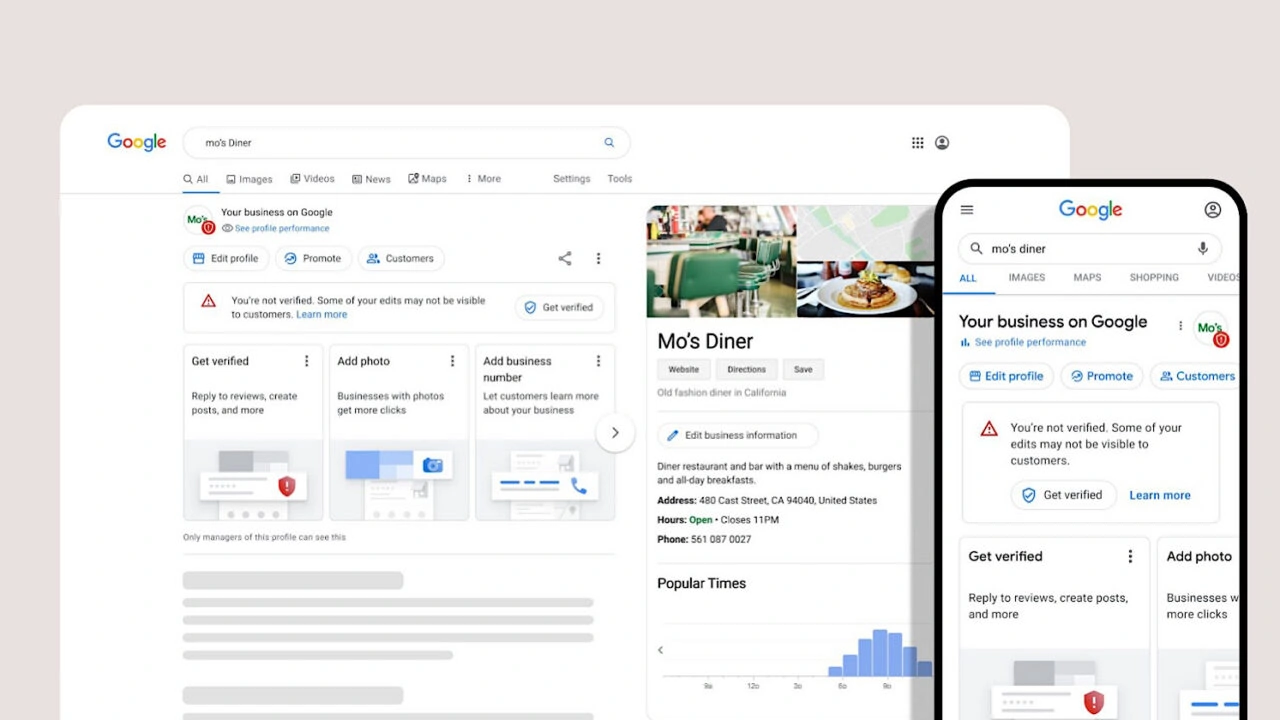
The Google Maps listing is what customers see, while the Google Business Profile dashboard is where businesses manage their information.
For example, when a business updates its phone number, business hours, or photos inside GBP, those changes can appear on its Google Maps listing after Google processes the update.
Common Mistakes Businesses Make About Google Maps And GBP
Many businesses misunderstand how these two platforms work together. Common mistakes include:
- Creating duplicate business listings on Google Maps.
- Ignoring outdated business information.
- Not responding to customer reviews.
- Assuming Google Maps and GBP are separate systems.
- Failing to verify and manage the business profile.
How Google Business Profile Information Appears On Google Maps
The information customers see on Google Maps is mainly created from the details managed inside your Google Business Profile. When a business owner updates important information, such as contact details, operating hours, photos, or services, those updates help keep the Google Maps listing accurate.
A well-maintained profile helps customers find reliable information when searching for nearby businesses, locations, and services.
Google Business Profile Management vs Google Maps User Experience
Google Business Profile and Google Maps support different parts of the local search experience. Business owners interact with GBP to control their information, while customers use Google Maps to discover and interact with businesses.
- Businesses manage details through Google Business Profile.
- Customers view locations and information through Google Maps.
- GBP updates can influence what appears on Maps.
- Maps provides discovery and navigation features.
This connection allows businesses to maintain accurate information while helping customers find the right services.
🚀 Need Help with Google Business Profile Verification?
If your Google Business Profile is suspended, requires Video Verification, Live Video Verification, Contact Support verification, or you're unable to verify your business due to the lack of a physical office, business license, or any other verification issue, our team is here to help. We have successfully assisted 10,000+ businesses worldwide with Google Business Profile verification and suspension issues. Ready to get your business verified? Contact our experts today or view our recent success stories below.
Can Customers Find A Business On Google Maps Without GBP?
Some businesses may appear on Google Maps even without actively managing a Google Business Profile because Google collects information from different sources. However, claiming and managing a profile gives businesses better control over their public information.
A managed profile allows owners to update important details and ensure customers receive accurate information about their business.
How Google Business Profile Photos Work With Google Maps
Photos added through a Google Business Profile can appear on the business listing shown in Google Maps. Visual content helps customers understand the business before visiting or contacting the company.
Businesses can use photos to show:
- Exterior location and entrance.
- Products and services.
- Workspace or business environment.
- Team members or business activities.
Updated photos can improve customer confidence and provide a better understanding of the business.
How Reviews Connect Google Business Profile With Google Maps
Customer reviews are visible on Google Maps and connected to the business profile managed through Google Business Profile. Reviews provide customers with feedback from previous experiences and help businesses understand customer opinions.
Businesses should regularly monitor reviews and provide helpful responses to maintain a professional online reputation.
Does Google Maps Ranking Depend Only On Google Business Profile?
No, Google Maps visibility depends on several factors, and having a Google Business Profile is only one part of the process. Google considers different signals when displaying local businesses to users.
Important local visibility factors may include:
- Business relevance to the search.
- Distance between the user and business location.
- Profile accuracy and completeness.
- Customer reviews and interactions.
- Overall trust signals related to the business.
Why Accurate GBP Information Matters For Google Maps
Incorrect business details can create confusion for customers using Google Maps. Wrong addresses, outdated hours, or incorrect contact information may result in poor customer experiences.
Maintaining accurate Google Business Profile information helps customers:
- Reach the correct location.
- Contact the business easily.
- Understand available services.
- Plan visits more effectively.
Google Business Profile Posts And Google Maps Visibility
Businesses can share updates, offers, announcements, and important information through their Google Business Profile. These updates can help customers learn more about the business when viewing the listing.
Regular profile activity can keep business information fresh and improve customer engagement.
Can A Business Edit Its Google Maps Listing Directly?
Businesses generally manage their listing information through their Google Business Profile rather than editing the public Google Maps listing directly.
After making approved changes in GBP, Google updates the information displayed across connected Google services, including Google Maps.
Google Maps Listing Problems Caused By Incorrect GBP Data
Incorrect information inside a Google Business Profile can create issues with the Google Maps listing. Common problems include:
- Wrong business address appearing on Maps.
- Incorrect operating hours.
- Missing services or business categories.
- Outdated photos or contact details.
Regularly reviewing profile information helps prevent these problems and keeps the listing useful for customers.
Best Practices For Managing Google Business Profile And Google Maps Presence
- Keep business information updated.
- Use accurate categories and service details.
- Add high-quality business photos.
- Respond professionally to customer reviews.
- Avoid duplicate business listings.
- Monitor how customers find and interact with your listing.
A properly managed Google Business Profile supports a stronger presence across Google Maps and helps customers access reliable business information.
Google Business Profile vs Google Maps: How They Work Together
Many businesses confuse Google Business Profile and Google Maps because both appear together when customers search for local services. However, they perform different roles in helping businesses connect with customers online.
Google Business Profile works as a management platform where businesses control their information, while Google Maps helps customers discover businesses, compare options, and find locations.
How Customers Use Google Maps To Find Businesses
Google Maps is mainly designed for customer discovery and navigation. When users search for nearby businesses, they use Maps to find locations, check details, compare services, and decide where to visit or contact.
Customers commonly use Google Maps to:
- Find nearby businesses and services.
- Check business hours before visiting.
- Read customer reviews and ratings.
- View photos of locations and services.
- Get directions and contact businesses.
A strong Google Maps presence helps businesses become easier for local customers to discover.
Role Of Google Business Profile In Local Search Visibility
A Google Business Profile listing provides Google with important information about a business. This information helps Google understand what the business offers and when it may be useful for local searches.
Businesses can improve their profile quality by maintaining:
- Accurate business descriptions.
- Updated service information.
- Relevant business categories.
- Fresh images and updates.
- Customer engagement through reviews.
The better the profile information, the easier it becomes for customers to understand the business before making contact.
Google Maps Listing vs Google Business Profile Dashboard
| Google Business Profile Dashboard | Google Maps Listing |
|---|---|
| Used by business owners to manage information. | Used by customers to discover businesses. |
| Allows updates to business details and content. | Displays available business information publicly. |
| Provides tools for managing customer interactions. | Provides search, location, and navigation features. |
| Focused on business control and optimization. | Focused on customer discovery and decision-making. |
Why Some Businesses Appear Higher On Google Maps
Businesses appearing in Google Maps results usually provide Google with strong signals about their relevance and usefulness for customers.
Important factors that can influence local visibility include:
- Accuracy of business information.
- Location relevance for customer searches.
- Quality and quantity of customer reviews.
- Customer interactions with the listing.
- Completeness of business details.
Maintaining an active and accurate business presence can improve how customers discover a company through Maps.
Google Maps Reviews And Customer Trust
Reviews play an important role in how customers evaluate businesses on Google Maps. Before contacting a company, many users check previous customer experiences to understand service quality.
Businesses should focus on:
- Encouraging genuine customer feedback.
- Responding professionally to reviews.
- Addressing customer concerns.
- Keeping business information consistent.
A positive review profile can help create stronger customer confidence.
Importance Of Photos In Google Business Profile And Google Maps
Photos help customers understand a business before they visit or make a purchase decision. Visual content can show the atmosphere, products, services, and overall business experience.
Useful photos may include:
- Exterior and interior views.
- Products or completed projects.
- Team members and workplace areas.
- Service examples.
Updated photos make a business listing more informative and engaging for potential customers.
Common Google Maps Problems Businesses Face
Businesses may experience visibility issues on Google Maps when their information is incomplete, outdated, or inconsistent across online platforms.
Common problems include:
- Incorrect business hours.
- Missing service information.
- Outdated contact details.
- Duplicate business listings.
- Incomplete profile information.
Regularly reviewing business details helps maintain a reliable online presence.
Google Business Profile And Google Maps For Multiple Locations
Businesses with multiple branches need to manage each location carefully to provide customers with accurate information.
Each location should have:
- Correct address information.
- Accurate opening hours.
- Location-specific photos.
- Relevant services.
- Updated customer information.
Proper management helps customers find the correct branch and improves the overall local search experience.
Understanding Google Business Profile And Google Maps Connection
Google Business Profile and Google Maps work together to help customers discover local businesses. A properly managed business profile provides information that can appear across Google services, including search results and map locations.
While Google Business Profile allows business owners to control important details, Google Maps helps customers find and interact with those businesses based on location and search intent.
- Google Business Profile manages business information.
- Google Maps displays business locations to users.
- Both platforms depend on accurate business details.
- Updated information improves customer experience.
How Google Business Profile Information Appears On Google Maps
The details added to a Google Business Profile can influence what customers see when they search for a business on Google Maps. Information such as business name, category, operating hours, photos, and services helps users understand the business before visiting.
A complete profile gives customers more confidence when choosing a local business from map search results.
- Business name and category visibility.
- Location information accuracy.
- Customer reviews and ratings.
- Photos and business updates.
- Available services and contact details.
Does Google Maps Replace Google Business Profile?
No, Google Maps does not replace Google Business Profile. Google Maps is mainly used by customers to discover places, get directions, and view local information.
Google Business Profile is the management platform that allows business owners to update information, respond to reviews, add photos, and maintain their online presence.
Why Businesses Need Both Google Business Profile And Google Maps
Businesses benefit from using both platforms because they serve different purposes. A Google Business Profile provides control, while Google Maps provides customer visibility.
Maintaining accurate information across both services helps customers find reliable details about a business.
- Customers can discover the business location easily.
- Owners can update important profile information.
- Businesses can respond to customer feedback.
- Local searches can display more useful information.
Google Maps Visibility Factors For Local Businesses
Appearing in Google Maps results depends on several factors related to business information, customer interaction, and local relevance. A complete Google Business Profile supports better understanding of the business by Google and potential customers.
Important factors include:
- Accurate business details.
- Correct location information.
- Regular profile updates.
- Customer reviews and engagement.
- Relevant business categories.
Managing Business Reviews Through Google Business Profile
Customer reviews displayed on Google Maps are connected with the business profile. Business owners can monitor feedback, respond professionally, and maintain communication with customers.
Active review management helps create trust and provides useful information for people comparing local businesses.
Google Business Profile Updates And Google Maps Changes
When businesses update their profile information, those changes may appear on Google services after Google's review process. Keeping details current helps prevent outdated information from confusing customers.
Regular updates can include:
- New business hours.
- Updated services.
- Fresh business photos.
- Seasonal announcements.
- Accurate contact information.
Common Confusion Between Google Maps Listing And Business Profile
Many business owners think their Google Maps listing and Google Business Profile are separate listings. In reality, the profile information is used to manage how the business appears across Google's local search features.
Benefits Of A Verified Google Business Profile On Maps
A verified profile provides businesses with better control over their public information and helps customers access reliable details when searching through Google Maps.
- Improved business information control.
- Greater customer confidence.
- Better communication opportunities.
- More accurate local search presence.
- Stronger connection with nearby customers.
Understanding this difference helps businesses avoid creating duplicate profiles or managing incorrect information.
Frequently Asked Questions (FAQs)
1. What is the difference between Google Business Profile and Google Maps?
Google Business Profile is a management tool that allows businesses to control their online information, while Google Maps helps customers discover business locations, directions, and local details.
2. Does Google Business Profile appear on Google Maps?
Yes, information from a Google Business Profile can appear on Google Maps. Customers can view business details such as location, hours, photos, services, and reviews through map results.
3. Is Google Maps a replacement for Google Business Profile?
No, Google Maps does not replace Google Business Profile. Google Maps helps customers find businesses, while Google Business Profile allows owners to manage and update their business information.
4. Why is Google Business Profile important for Google Maps visibility?
A complete and accurate Google Business Profile helps Google understand business information and display relevant details to users searching through Google Maps.
5. Can customers find my business without Google Business Profile?
A business may appear in some Google results through publicly available information, but having a managed Google Business Profile gives owners more control over their displayed information.
6. Do Google Maps reviews come from Google Business Profile?
Yes, customer reviews shown on Google Maps are connected with the related Google Business Profile. Business owners can manage responses through their profile dashboard.
7. Can I edit my Google Maps business information?
Yes, verified business owners can update information displayed on Google Maps through their Google Business Profile management account.
8. Which one helps local SEO more, Google Business Profile or Google Maps?
Google Business Profile plays an important role in local SEO because it provides business information that can appear across Google services, including Google Maps.
9. Why is my business not showing correctly on Google Maps?
Incorrect details, incomplete profile information, verification problems, or outdated business data can affect how a business appears on Google Maps.
10. Does verifying Google Business Profile improve Google Maps presence?
Verification helps confirm that a business is legitimate and gives owners access to manage their listing information, which supports a more reliable presence on Google Maps.
11. Can I manage multiple locations on Google Maps?
Yes, businesses with multiple locations can manage their locations through Google Business Profile tools and maintain consistent information across Google services.
12. What information appears from Google Business Profile on Maps?
Google Maps can display information such as business name, address, category, operating hours, photos, customer reviews, and service details from the connected profile.
13. Why do businesses need accurate Google Maps information?
Accurate information helps customers reach the correct location, understand available services, and make better decisions before contacting a business.
14. Can changing Google Business Profile details affect Google Maps?
Yes, updates made to a Google Business Profile may affect the information displayed on Google Maps after Google's systems review and process the changes.
15. Which is better for businesses, Google Business Profile or Google Maps?
Both serve different purposes. Google Business Profile gives businesses control over their online listing, while Google Maps helps customers discover and interact with those businesses locally.
.png)
.png)
.png)
.png)
.png)
.png)
.png)
.png)