Checking your Google Business verification status is one of the first things you should do after submitting a verification request for your Google Business Profile. A profile may be waiting for verification, already verified, asking for another verification method, or experiencing an issue that prevents the listing from becoming fully available. Knowing exactly where your profile stands helps you avoid unnecessary changes, understand what Google expects from you, and take the correct next step without creating additional profile problems.
Google Business Profile is now the name most businesses use for what was previously known as Google My Business (GMB). Regardless of which name you use, the verification process is designed to help Google confirm that a business is legitimate and that the person managing the profile is authorized to represent it. This makes verification an important part of establishing and maintaining a reliable business presence across Google Search and Google Maps.
In this guide, you will learn how to check Google Business verification status, how to tell whether your Google Business Profile is verified, what pending or processing status means, what to do when verification takes longer than expected, and how to identify the difference between verification and actual listing visibility. The goal is to help you understand your profile status clearly instead of relying on assumptions or outdated information.
If you have already submitted your verification and simply want to know whether Google has completed the process, start with the status-checking steps below. Once you understand the current status, you can decide whether you need to wait, provide additional information, complete another verification method, or investigate a separate visibility or profile-management issue.
How to Check Google Business Verification Status
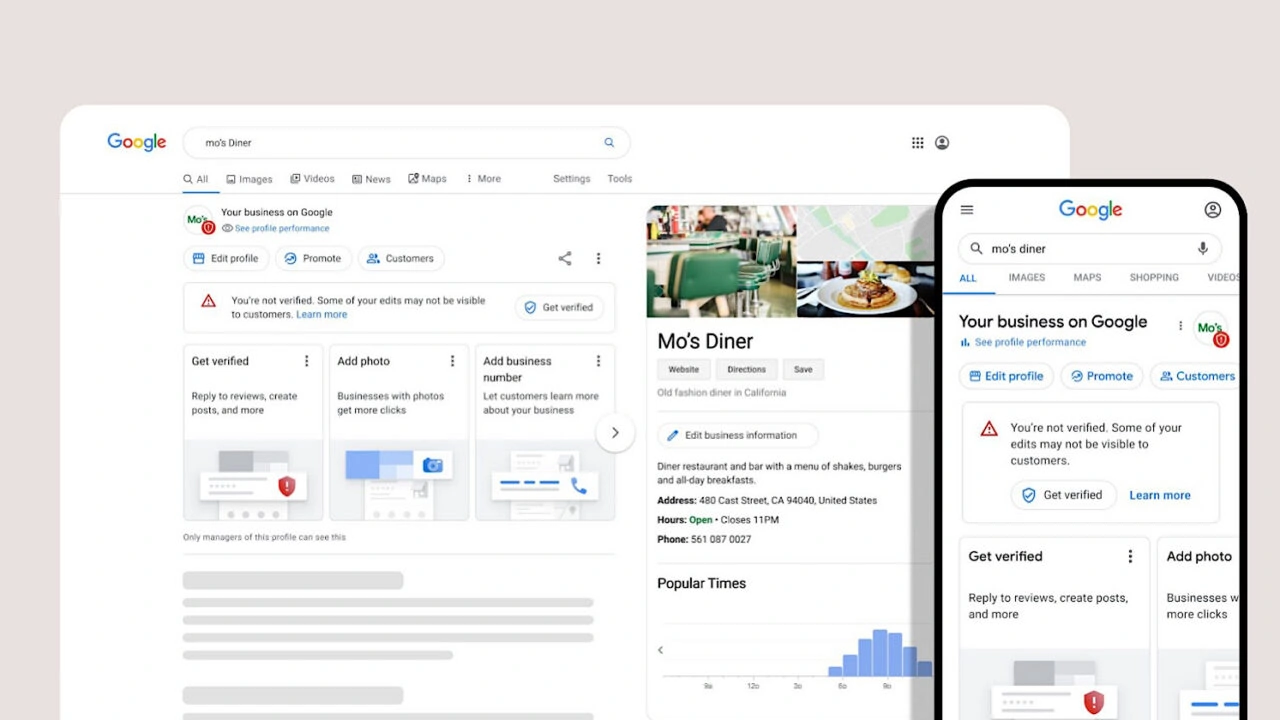
The easiest way to check your Google Business Profile verification status is to sign in to the Google account that manages the business profile and open the profile management area. Google may display information about your verification status, available verification methods, pending actions, or other profile-related messages. The information shown can vary depending on your business, account, location, and the verification options currently available to your profile.
The exact interface can change depending on your account, business type, location, and the current verification method offered by Google. Therefore, it is better to focus on the status and instructions shown for your specific profile rather than relying on an old screenshot or outdated menu path. Google regularly updates its Business Profile experience, so the wording or location of certain options may look different from older guides.
- Sign in to the Google account that manages your Business Profile.
- Search your exact business name on Google while signed in to the managing account.
- Open the Business Profile management area associated with your business.
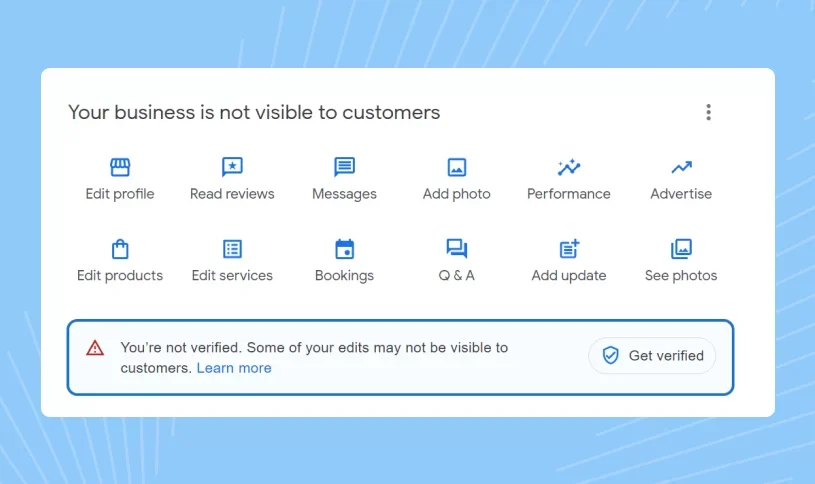
- Look for the verification message, verification option, or current profile status.
- Read any instructions Google provides and complete the requested verification step if necessary.
- After submitting verification, return to the profile later to check whether the status has changed.
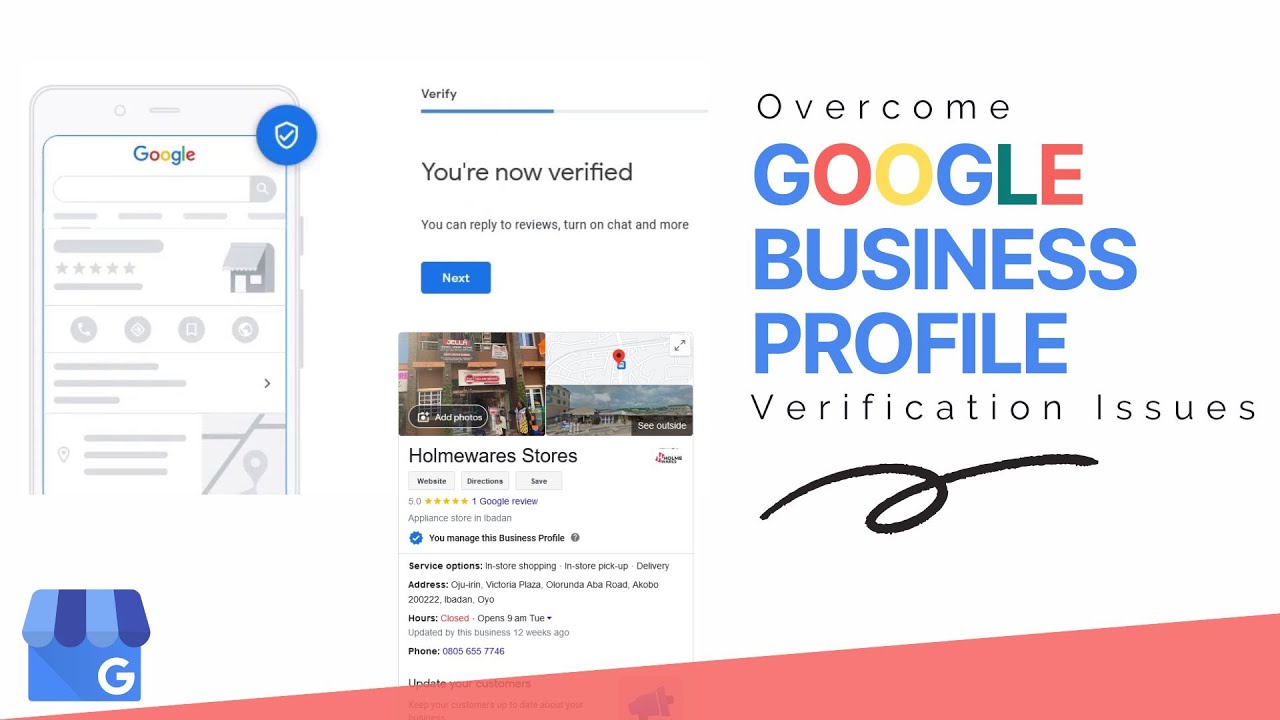
If your profile is already verified, Google may no longer show the same verification prompt that appeared before submission. Instead, you may be able to manage your business information directly from your Business Profile. Access to management features is therefore one useful indication that the verification process has been completed, although public visibility should still be considered separately from verification.
If you cannot find the status you expected, first make sure you are using the correct Google account. Many verification problems are actually account-access or profile-management issues rather than failed verification. If you manage multiple businesses, also confirm that you are viewing the correct location before assuming that the verification information is missing.
What Does Google Business Verification Status Mean?
Your verification status tells you where your business currently stands in Google's verification process. It is important to understand the status correctly because verification status and Google Search visibility are not exactly the same thing. A verified profile can still experience visibility, ranking, indexing, eligibility, or profile-quality issues that are unrelated to the original verification process.
A profile can be waiting for verification, successfully verified, or require additional action. In some cases, a business owner may assume that the profile is not verified simply because the listing is not appearing for a particular search. That assumption can lead to unnecessary edits, duplicate profiles, repeated verification attempts, or other changes that may make the situation more complicated.
The correct approach is to check the status first, understand what Google is asking for, and then address the specific issue. If Google has not requested another action, there may be no reason to repeatedly submit verification or make major profile changes. Understanding the difference between a verification problem and a visibility problem can save significant time.
How Do I Know If My Google Business Profile Is Verified?
One of the most common searches related to Google Business Profile is “how do I know if my Google Business is verified?” The simplest answer is to access the profile using the Google account that manages it and look for the verification-related status or management access. If Google continues to request verification, the process may not yet be complete.
A verified profile normally allows the authorized business owner or manager to manage the Business Profile. You may be able to edit business information, manage photos, respond to reviews, publish eligible updates, and access other profile-management features. These management capabilities are useful indicators that you are working with an active profile rather than a profile that is still waiting for initial verification.
However, public visibility should not be used as the only test of verification. A profile can be verified while experiencing visibility, indexing, ranking, eligibility, or quality-related issues. For example, a verified business may not appear prominently for competitive local searches even though the profile itself is successfully verified.
If your profile has been verified but is not appearing on Google Maps or Google Search, you should investigate the visibility problem separately instead of immediately repeating the verification process. Checking the profile status, business information, possible restrictions, duplicate listings, and search context can provide a much clearer understanding of the actual problem.For related troubleshooting, you can also read our guide on why a Google Business Profile may not be showing on Google Maps .
Where Can I Check My Google Business Verification Status?
Your verification information is connected to the Google account that manages the Business Profile. This means that checking from an unrelated Google account may not show the same information. If another employee, agency, or previous owner manages the profile, you may need to confirm that you have the correct level of access before expecting to see verification-related information.
If you manage multiple businesses, pay particular attention to the profile you have selected. A business owner can sometimes have access to several profiles, and checking the wrong profile can make it appear as though the verification information is missing. Always confirm the exact business name and location before taking further action.
Before contacting support, confirm these three things:
- You are signed into the correct Google account.
- You are viewing the correct Business Profile.
- You have checked the latest message or verification instruction shown by Google.
If you are managing several locations, the process can require additional organization. Businesses with multiple locations should keep each location's information accurate and avoid creating unnecessary duplicate profiles. Each location should represent a genuine business location and should be managed through the appropriate Business Profile structure.If you need to verify several locations, our detailed guide on how to verify multiple business locations on Google can help you understand the process more clearly.
What Does Pending Google Business Verification Mean?
A pending Google Business verification status generally means that the verification process has not been completed yet. Google may still be reviewing information or processing the verification request. Pending status does not automatically mean that the business has been rejected, suspended, or permanently denied.
Pending does not automatically mean that your business has been rejected. It is important not to panic or repeatedly submit verification requests simply because the status has not changed immediately. Repeatedly changing information or attempting unnecessary verification methods can make it harder to understand what is actually happening with the profile.
Depending on the circumstances, Google may need to review information associated with your business, location, category, ownership, or selected verification method. Some businesses may also be asked to provide additional evidence. The exact process can vary, so the instructions shown inside your own Business Profile should take priority over generic advice.
While your verification is pending, avoid making unnecessary major changes to important business information. If your business name, address, category, or other significant information genuinely needs to be corrected, make the change because it is accurate—not simply because you want to force the verification process to move faster. Accuracy should always be more important than trying to manipulate the review process.
What Does Processing Mean During Google Business Verification?
Business owners sometimes see wording such as processing and wonder whether something has gone wrong. Processing generally indicates that Google is working through the submitted information or verification request. It should not automatically be interpreted as a failed verification or a permanent problem with the business profile.
The important point is that processing is not necessarily the same as rejection. If Google has not asked you to take another action, repeatedly changing your profile may not help. Making unnecessary changes while a review is underway can create additional inconsistencies and make it more difficult to identify the original issue.
Instead, monitor the profile, check your account for new instructions, and make sure the information you submitted is accurate and consistent with your actual business. If Google provides another verification option or requests additional information, follow the instructions carefully rather than relying on unofficial shortcuts.
How Long Does Google Business Verification Take?
One of the most searched questions is “how long does Google take to verify my business?” There is no single guaranteed verification time that applies to every business. The amount of time can depend on the verification method, profile information, business type, location, account history, and whether additional review is necessary.
Verification time can vary depending on the verification method available to your business, the information associated with the profile, the type of business, and whether Google requires additional review. Some businesses may complete verification relatively quickly, while others may need to wait longer while Google processes the information.
Some businesses may be processed relatively quickly, while others may experience a longer review period. If your verification remains pending, the best approach is to follow the instructions displayed by Google and avoid repeatedly submitting conflicting information. Waiting for the current review to complete is often better than making unnecessary changes.If you are specifically interested in verification timelines, see our related resource: how long does Google Business Profile verification take?
Why Is My Google Business Verification Still Pending?
A Google Business Profile can remain pending for several reasons. There is no universal reason that applies to every profile, so the most useful approach is to review the information associated with your specific business. Google may need additional time to process submitted information or may require another verification step before the profile can move forward.
Incomplete Business Information
If important business information is missing or unclear, additional review may be necessary. Your business details should accurately represent the real-world business and should not contain unnecessary promotional wording. Accurate information helps create a clearer representation of the business and reduces the possibility of confusion during profile review.
Inconsistent Business Information
Major inconsistencies between your website, business information, and other online references can create confusion. Your business name, address, phone number, service area, and other important details should accurately represent the same business. Consistency is useful not only for verification but also for creating a reliable customer experience.
Additional Verification Requirements
Google may provide a particular verification method depending on your business and account. Some businesses may be asked for video verification or another form of evidence. If an additional method is offered, follow the instructions provided by Google and submit genuine information that accurately represents your business operations.
Business Location Concerns
Businesses operating from a physical location and businesses serving customers at their locations can have different profile requirements. If your business does not have a customer-facing storefront, make sure your profile accurately reflects how the business operates. Do not use an address simply because you believe it will make verification easier.For businesses without a traditional physical storefront, read our guide: Can you verify a Google Business Profile without a physical store?
How to Check Google Business Verification Status After Video Verification
Video verification can be an important part of the verification process for some businesses. If Google has asked you to complete video verification, carefully follow the instructions provided in your profile. The video should accurately represent the real business and should contain the information or evidence requested by Google.
After submitting the required verification material, return to your Business Profile and monitor the status. Do not assume that completing the video automatically means the profile will become publicly visible immediately. Verification completion and public visibility can involve different stages.
Google may still need to process or review the submission. If the status changes or Google requests another action, follow the latest instructions shown in your account. Avoid submitting unrelated or conflicting information while the existing verification review is still being processed.For a more detailed explanation of the process, visit our guide on Google Business Profile video verification .
How to Check Google Business Profile Status in Google Maps
Google Maps is an important part of local search, but seeing or not seeing a business on Maps should not be treated as the only way to determine verification status. A business may be verified while not appearing prominently for every local search, especially when competition is high or the search is performed from a different location.
If you are signed into the Google account managing the profile, searching for the business can help you access the Business Profile management experience. From there, you can review available information and determine whether Google is asking you to complete verification. This is more reliable than judging verification only from public search results.
If your business is verified but you cannot find it publicly on Maps, investigate visibility separately. Check whether the profile has restrictions, whether the information is accurate, and whether Google has provided any additional notification. Also consider whether you are searching from a location where the business would normally be expected to appear.
Verified But Not Showing on Google Search or Maps
A verified Business Profile and a highly visible Business Profile are two different things. Verification establishes that Google has accepted the business for management through its verification process, but it does not guarantee a particular ranking position or immediate visibility for every search. Local search results can vary based on location, relevance, competition, and other factors.
If your profile is verified but you cannot find it, consider the following:
- Search the exact business name rather than a broad keyword.
- Confirm that you are looking at the correct location.
- Check whether the profile contains accurate business information.
- Review any notifications or restrictions associated with the profile.
- Check whether there are duplicate profiles for the same business.
- Give Google time to process recent changes.
Ranking is also influenced by relevance, distance, prominence, competition, profile quality, and other local-search factors. Therefore, verification is an important foundation, but it is not a shortcut to a number-one ranking. Businesses should focus on maintaining accurate information and providing useful content to customers after verification is completed.
Google Business Verification Status vs. Profile Visibility
Understanding the difference between verification status and visibility status can save a business owner a lot of time. Verification relates to Google's process for confirming the business and allowing authorized management, while visibility concerns whether and where the profile appears publicly in Search and Maps.
A business can therefore have a verified profile without automatically ranking for every keyword or appearing in every map search. This is particularly important for businesses operating in competitive markets where many companies offer similar services. Checking the correct status helps you determine whether the problem is actually related to verification.
| Status | What It Means |
|---|---|
| Verification Pending | Google has not completed the verification process yet. |
| Verified | The business has completed an available verification process and can manage its profile. |
| Verification Required | Google is asking the business owner to complete an available verification method. |
| Verified but Not Visible | The profile may be verified while another visibility, eligibility, indexing, or quality issue affects public discovery. |
This distinction is especially important for businesses that have already completed verification but are worried because the profile is not appearing for competitive local searches. Before changing the profile or requesting another verification, identify whether the actual issue is visibility, ranking, eligibility, account access, or a profile restriction.
How to Check If Your Google Business Profile Is Live
To determine whether your Business Profile is publicly visible, search for the exact business name and location on Google. You can also check Google Maps using the business name and address. Searching for the exact business name is generally more useful than immediately testing broad keywords because broad searches depend heavily on location and local ranking factors.
Do not judge your profile only by searching a broad service keyword such as “plumber near me” or “best dentist.” Local search results are personalized and influenced by location and other factors, so a verified business may not appear for every keyword. A business can be verified while still needing time or optimization to build stronger local visibility.
A better test is to search for your exact business name and location and then confirm that the correct business information is displayed. Check the business name, address, phone number, website, hours, and other important details to ensure that the public profile represents the correct business.
If your business is not appearing even for its own name, investigate the profile status and eligibility more closely. Look for notifications, restrictions, duplicate listings, ownership problems, or recent changes that may still be processing.
What to Do If You Cannot Find Your Verification Status
If you cannot find your Google Business verification status, start with the basics. Make sure you are signed into the Google account that owns or manages the profile. If you have access to several profiles, verify that you are viewing the correct business location. Using the wrong account or location is a common reason for confusion.
Next, search the exact business name on Google and look for the Business Profile management interface. Check for verification instructions, notifications, or requests for additional information. If Google has already completed verification, you may not see the same verification prompt that appeared during the initial setup.
If the profile still does not behave as expected, avoid creating another Business Profile simply because the first one is difficult to access. Duplicate profiles can create additional complications and may make it harder to determine which listing should be managed.
If you have lost access to the profile itself, the problem may be account ownership rather than verification status. In that situation, the correct solution is to recover access to the existing profile instead of creating a replacement listing. Keeping the original profile can preserve its existing history and customer information.Our guide on how to recover a lost Google Business Profile covers this situation in more detail.
What If Someone Else Owns the Google Business Profile?
Ownership can become a major issue when a business changes employees, agencies, marketing companies, or owners. A profile may exist and even be verified, but the current business owner may not have the appropriate access. In this situation, the profile's verification status and your personal ability to manage it are two different matters.
If another person or company controls the profile, do not create a second profile just to regain control. The better approach is to follow Google's ownership and access process for the existing profile. This helps avoid duplicate listings and keeps the business's established profile connected to the correct business information.If ownership needs to be transferred, see our guide on how to transfer ownership of a Google Business Profile .
Can Google Business Profile Verification Be Checked With a Verification Tool?
Business owners often search for a Google Business verification status checker or an online tool that can instantly tell them whether their profile is verified. While third-party tools may provide general information or local search data, they should not be treated as an official replacement for the status information available through the Google account managing your Business Profile.
Be careful with third-party tools that claim to provide information they cannot legitimately access. Your actual verification status is connected to Google's systems and your Business Profile account. The most reliable way to understand the status is to check the profile through the Google account that manages it and follow the instructions provided by Google.
A third-party website can provide guidance or help you understand a status message, but it should not be treated as a replacement for the information shown inside your Google Business Profile. If a tool asks for unnecessary account credentials or makes unrealistic promises about instantly verifying a business, use caution.
How Google Business Verification Differs From GMB Verification
Many people still search for GMB verification because Google My Business was the former name of Google's local business management platform. Today, Google Business Profile is the current terminology. This means that older articles may use GMB language even though the current Google interface uses Business Profile terminology.
Therefore, phrases such as “GMB verification status,” “Google My Business verification status,” and “Google Business Profile verification status” generally refer to the same broader concept: confirming and managing the business's presence through Google's business profile system. The terminology has changed, but businesses still need to understand the verification and management process.If you are looking for general verification assistance rather than only a status check, you can learn more about our Google Business Profile and GMB service .
How to Avoid Delays When Checking Google Business Verification
Although no business can guarantee a particular verification speed, good preparation can reduce avoidable problems. The best approach is to provide accurate business information from the beginning and use the verification method made available by Google. Avoid shortcuts, misleading information, fake locations, or unnecessary profile changes.
Use Accurate Business Information
Always use genuine business information. Your business name, address, phone number, website, service area, and category should accurately describe the real business. Information should be clear enough for customers and Google to understand what the business is, where it operates, and how customers can interact with it.
Do Not Add Unnecessary Keywords to the Business Name
Your Google Business Profile name should represent the actual business name rather than being written as a list of search keywords. Trying to manipulate the business name for rankings can create problems rather than improving local SEO. Keep the name accurate and consistent with how the business is legitimately represented.
Use the Correct Business Category
Your primary category should accurately describe the main service or business type. Additional categories can be used where appropriate, but they should also accurately represent the business. Choosing unrelated categories simply to appear for more searches can create an inaccurate profile and may negatively affect the overall quality of the listing.
Keep Business Information Consistent
Make sure your website and other legitimate business references contain accurate information. Consistency helps customers and search engines understand the business. If important details such as the business name, address, phone number, or website are repeatedly inconsistent, review the information and correct genuine errors before continuing with verification.
Do Not Create Duplicate Profiles
If an existing profile is already associated with your business, creating another profile can create unnecessary confusion. Always investigate the existing listing first. If you cannot access it, focus on recovering ownership or obtaining the correct management access rather than immediately creating another profile.
Google Business Profile Verification for Service-Area Businesses
Service-area businesses often have different requirements from businesses that operate from a traditional customer-facing storefront. If customers do not visit your business address, your profile should accurately represent the way you actually serve customers. The information displayed should match the real business model rather than attempting to create the appearance of a physical storefront.
Do not use a virtual office, fake address, or location that does not represent your legitimate business operations simply to obtain verification. Such information can create serious profile problems later and may make it more difficult to establish trust in the business listing.
If you operate a service-area business, make sure your profile information accurately reflects the business model and follow the verification method Google makes available to your profile. Use genuine business evidence whenever Google requests additional information and keep your profile information aligned with the way the business actually operates.
What to Do If Google Asks for Additional Verification
If Google asks for additional verification, follow the instructions provided in your Business Profile rather than attempting to bypass the process. Additional verification is part of Google's effort to confirm the legitimacy of a business and the relationship between the business and the person managing its profile.
Additional verification may require information or evidence that helps establish the legitimacy and operation of the business. The exact requirements can vary, so the instructions shown for your profile should take priority. Do not submit unrelated documents or information simply because another business used them for a different verification process.
If your business is having difficulty completing verification, professional guidance can help you understand what information should be prepared and what common mistakes should be avoided. The objective should always be to provide accurate information that genuinely represents the business rather than trying to manipulate the verification process.Businesses looking for a broader verification service can visit our Google Business Profile service for additional information.
Google Business Verification and Local SEO
Verification is an important foundation for a local search presence, but it should not be confused with SEO ranking itself. Completing verification gives an authorized business the ability to manage its profile, but it does not guarantee a particular ranking position in Google Search or Google Maps.
Once a profile is verified, businesses should focus on maintaining accurate information and providing useful information to potential customers. Relevant business categories, accurate contact details, appropriate services, genuine photos, reviews, and a useful website can all contribute to a stronger local presence. These elements should represent the real business rather than being created only for search engines.
The objective should not simply be to get a “verified” label. The real goal is to build a trustworthy business presence that accurately represents the company and helps customers make informed decisions. Verification is the foundation, while accurate management and useful customer information support the long-term value of the profile.
How to Monitor Your Google Business Profile After Verification
Verification is not the end of the process. Once your profile has been verified, continue monitoring it regularly. Business information can change, customer reviews can be added, and Google may sometimes request additional information or display notifications that require attention.
- Check that your business name remains accurate.
- Review your address and service area.
- Keep business hours updated.
- Monitor customer reviews.
- Upload genuine and useful business photos.
- Review profile notifications.
- Watch for unexpected changes to your business information.
Regular monitoring helps you identify problems before they become larger issues. It also ensures that customers receive accurate information when they find your business through Google Search or Maps. A well-maintained profile is more useful to customers and provides a better foundation for your broader local SEO strategy.
When Should You Contact Google Business Profile Support?
You should consider support when the issue cannot be resolved through the normal profile-management process or when Google specifically provides an option to request additional assistance. Support can be particularly useful when you have followed the available verification instructions but the profile remains stuck, inaccessible, restricted, or otherwise affected by an unresolved issue.
Before contacting support, collect the important details related to your profile. This may include your business name, profile information, verification messages, screenshots of relevant errors, and evidence showing that the business is legitimate. Having the relevant information ready can make it easier to explain the problem clearly.
Avoid sending multiple conflicting requests without understanding the original problem. A clear and accurate support request is generally more useful than repeatedly submitting incomplete information. First identify whether you are dealing with verification, ownership, visibility, suspension, or another type of Business Profile issue.
Google Business Verification Status Checklist
Before deciding that your verification has failed, work through this checklist carefully. Many apparent verification problems are actually caused by using the wrong account, viewing the wrong business location, missing a Google notification, or confusing verification with public visibility. Checking each item can help you identify the real issue before contacting support.
- Confirm that you are using the correct Google account.
- Confirm that you are viewing the correct business profile.
- Check the latest verification message.
- Review whether Google has requested additional verification.
- Confirm that your business information is accurate.
- Check for duplicate profiles.
- Avoid unnecessary changes while a review is in progress.
- Check whether the profile is verified but experiencing a separate visibility issue.
- Keep screenshots or records of important verification messages.
- Use the appropriate Google support or appeal process when necessary.
Need Help With Google Business Profile Verification?
If your Google Business Profile is stuck in verification, requires video verification, has an ownership problem, or you are unable to complete the verification process, professional guidance can help you understand the issue and choose the correct next step. The most important part is identifying whether the problem is related to verification, account access, profile ownership, visibility, or another Business Profile requirement.
Webo Creators provides Google Business Profile verification and related assistance for businesses dealing with verification, profile access, and Google Business Profile issues. Our team can help businesses understand their current situation and prepare for the appropriate next step while keeping the focus on accurate and legitimate business information.
Final Thoughts: How to Check Google Business Verification Status
Knowing how to check Google Business verification status gives you a much clearer understanding of what is happening with your Business Profile. Instead of guessing whether your business is verified, pending, processing, or experiencing another issue, you can check the profile through the correct Google account and review the information Google provides. This simple approach helps you choose the right action without creating unnecessary changes.
Remember that verification and visibility are different. A verified Google Business Profile does not automatically guarantee a particular ranking position, immediate visibility for every keyword, or instant appearance in every Google Maps search. Once verification is complete, your attention should move toward keeping the profile accurate, trustworthy, complete, and useful to customers.
If verification is still pending, avoid unnecessary changes and follow the instructions provided by Google. If additional verification is requested, provide accurate information and complete the available verification method carefully. If the profile is verified but not appearing publicly, investigate visibility and eligibility separately rather than repeatedly submitting verification.
A properly managed Google Business Profile can become an important part of your local search presence. The first step is understanding its current status; the next is maintaining the profile correctly after verification. By keeping business information accurate, monitoring profile notifications, and responding appropriately to verification requests, you can maintain a more reliable Google Business Profile over time.
Frequently Asked Questions About Google Business Verification Status
1.How do I check my Google Business verification status?
Sign in to the Google account that manages your Business Profile and open the profile management area. Google may show your current verification status, available verification method, pending action, or other instructions. If you manage multiple profiles, confirm that you are viewing the correct business location before making any changes.
2.How do I know if my Google Business Profile is verified?
Access your Business Profile using the managing Google account and check whether Google still asks you to complete verification. A verified profile normally provides access to profile-management features without the original verification prompt. However, public visibility should be checked separately because verification does not guarantee a particular search ranking.
3.What does pending mean on Google Business Profile verification?
Pending generally means that Google has not completed the verification process yet. The profile may still be under review or processing, so follow the instructions provided by Google and avoid unnecessary changes. A pending status does not automatically mean that the business has been rejected or that verification has permanently failed.
4.How long does Google Business Profile verification take?
Verification time varies by business and verification method. Some profiles may be processed quickly, while others may require additional review or information before verification is completed. If your profile remains pending, follow the latest instructions provided by Google and avoid repeatedly submitting conflicting information.
5.Why is my Google Business verification still pending?
A verification request can remain pending while Google reviews the submitted information or processes the selected verification method. In some situations, additional verification may be required. Review your profile for new instructions and make sure the information you provided accurately represents the real business.
6.Can I check my Google Business verification status without logging in?
Detailed verification information is associated with the Google account managing the profile. You should use the authorized account to view the available verification information and profile-management options. If you cannot access the correct account, the issue may involve ownership or account access rather than verification itself.
7.What does processing mean in Google Business Profile verification?
Processing generally indicates that Google is handling the verification request. It does not automatically mean that the verification has failed. While the request is processing, monitor the profile for additional instructions and avoid making unnecessary major changes that could create inconsistencies.
8.How do I know when my Google Business Profile is verified?
Check the Business Profile through the Google account managing it. If the verification requirement has been completed and Google no longer asks you to verify the profile, your profile may have completed the verification process. You should still distinguish verification from public visibility because a verified profile may require additional time or work to appear for relevant searches.
9.Why is my Google Business Profile verified but not showing on Google Maps?
Verification does not guarantee immediate public visibility for every search. A verified profile can still experience indexing, eligibility, quality, visibility, or ranking-related issues. Check the exact business name, profile information, notifications, possible restrictions, and duplicate listings before assuming that the verification itself has failed.
10.Can I verify my Google Business Profile again if it is pending?
Do not repeatedly submit verification simply because the status has not changed. First check the latest instructions provided by Google and complete another verification step only when Google makes it available or requests it. Repeated unnecessary attempts can create additional confusion instead of resolving the original issue.
11.What should I do if Google asks for video verification?
Follow the verification instructions provided inside your Business Profile and submit the required information through Google's available process. After submission, monitor the profile for a status update or additional request. Make sure the information shown during verification accurately represents the real business and its operations.
12.Can a business without a physical storefront get verified?
Some service-area businesses can have a Google Business Profile even when customers do not visit a traditional storefront. The business must accurately represent its real operations and follow Google's applicable requirements. Businesses should not use fake locations, virtual offices, or misleading addresses simply to make verification easier.
13.Can changing my business information affect verification?
Significant changes to information such as the business name, address, or category can result in additional review. Only make changes that accurately reflect genuine changes to the business. If your profile is already being reviewed, avoid unnecessary edits and make sure any required updates are accurate and consistent.
14.Does Google Business verification guarantee higher rankings?
No. Verification is an important foundation for managing a Business Profile, but local ranking depends on multiple factors. Verification alone does not guarantee a specific position in Google Search or Maps. Local relevance, distance, prominence, competition, profile quality, and other signals can influence how a business appears in local search.
15.What should I do if I cannot find my Google Business verification status?
First confirm that you are signed into the correct Google account and viewing the correct business profile. Then check the profile for verification instructions, notifications, or other messages. If the issue remains unresolved, use the appropriate Google support process and avoid creating a duplicate profile simply because the existing profile is difficult to access.
.png)
.png)
.png)
.png)
.png)
.png)
.png)
.png)