Learn whether you can use Google Meet for Google Business verification and understand the process of verifying your Google Business Profile. This guide explains how Google verification works, what requirements you need, and how to complete your Google profile listing verification successfully.
Why is Google Business Verification Important?
Google Business Profile verification helps Google confirm that your business is genuine and operating at the listed location. For businesses using Google Business Profile, Google My Business (GMB), and GBP listings, verification is important to:
- Build trust with customers searching for your business online.
- Improve visibility in Google Search and Google Maps results.
- Protect your business information from unauthorized changes.
- Show accurate location, services, and contact details.
- Create a stronger local presence through your Google listing profile.
🚀 Need Help with Google Business Profile Verification?
If your Google Business Profile is suspended, requires Video Verification, Live Video Verification, Contact Support verification, or you're unable to verify your business due to the lack of a physical office, business license, or any other verification issue, our team is here to help. We have successfully assisted 10,000+ businesses worldwide with Google Business Profile verification and suspension issues. Ready to get your business verified? Contact our experts today or view our recent success stories below.
What You Need for Google Business Video Verification
Your Google Business video verification requires clear proof that your business exists and that you manage the profile:
- Business Location Proof: Show your actual business location, entrance, and permanent signage.
- Business Operations: Display your workspace, products, equipment, or services to verify your business activity.
- Profile Information Match: Ensure your details match your Google Business Profile listing information.
- Clear Verification Video: Record a clear video that follows Google's verification guidelines.
This verification process helps Google confirm your business authenticity and improves the chances of successfully approving your Google profile listing.
Can You Use Google Meet for Google Business Verification?
Many business owners ask if Google Meet can be used for Google Business verification. Google Meet is a video communication platform, but it is not generally a replacement for the official Google Business Profile verification video process. Google usually requires verification through the available methods provided inside your business profile.
- Google Video Verification: Submit a video showing your business location, operations, and ownership connection.
- Live Verification: Complete a live verification process if Google provides this option for your profile.
- Alternative Verification Methods: Use phone, email, postcard, or other options when available.
- Follow Google Guidelines: Keep your business information accurate to avoid verification issues.
Google Business Verification Challenges Businesses Face
Many businesses struggle with Google Business Profile verification because they are not prepared with the right information or proof. A verification video is not just a simple recording; it helps Google confirm that your business is real and operating at the provided location.
Common issues during Google Business video verification include unclear business signage, incomplete profile information, showing a different location, or failing to provide enough evidence of business operations. These mistakes can delay the approval process and affect your ability to manage your Google listing profile.
- Incorrect business information on the Google Business Profile.
- Low-quality or unclear verification videos.
- Missing business signs, equipment, or workspace proof.
- Mismatch between online profile details and real-world business information.
Expert Tips for Successful Google Business Profile Verification
Following the right approach can increase your chances of completing GBP verification successfully. Experts recommend preparing your business information before starting the verification process.
- Make sure your business name, address, and category are accurate.
- Record your verification video in a well-lit environment.
- Show permanent business details that prove your location.
- Include important areas such as your entrance, workspace, products, or equipment.
- Keep your Google Business Profile information updated regularly.
Google Business Verification Video Example Explained
A successful Google Business verification video should clearly represent your actual business. For example, a restaurant owner can show the exterior sign, entrance, kitchen area, equipment, and daily operations. A service-based business can show the office location, tools, staff area, and other proof of business activity.
The purpose of this video is to help Google understand that your Google profile listing represents a genuine business and is managed by an authorized person.
Common Mistakes to Avoid During GBP Verification
Many verification problems happen because businesses focus only on submitting a video instead of providing clear proof. Avoid these common mistakes:
- Do not use edited or misleading videos.
- Do not show a location different from your registered business address.
- Do not hide important business details during verification.
- Do not ignore Google's business profile guidelines.
Case Study How Proper Google Business Profile Verification Builds Trust
A local service business was struggling to appear in Google Maps results because its Google Business Profile listing was not verified properly. After updating business information, improving profile accuracy, and completing the verification process with clear evidence, the business gained a stronger online presence.
With a verified profile, customers were able to find accurate business details, view services, and interact with the company more easily. This shows how proper Google Business verification can improve customer trust and local search visibility.
Why Verified Google Business Profiles Matter for Local SEO
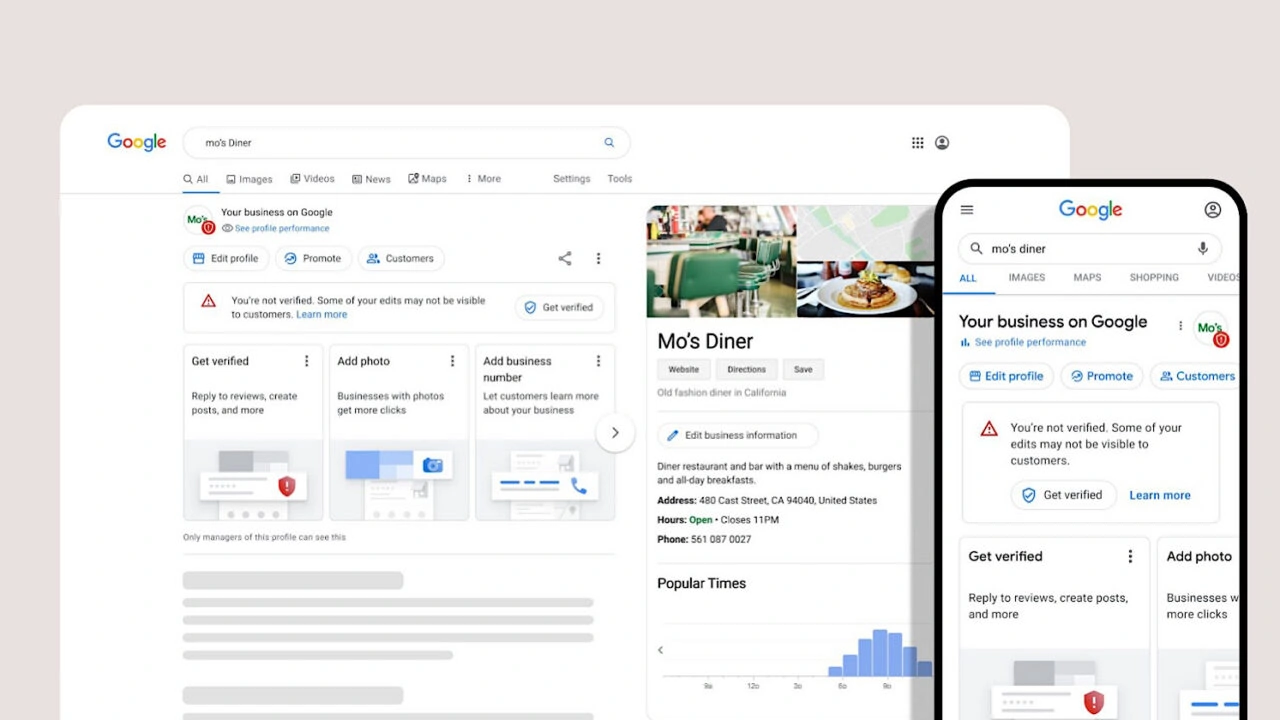
A verified Google Business Profile plays an important role in local SEO. It helps businesses appear more trustworthy and provides customers with important information such as location, services, opening hours, and contact details.
For businesses targeting local customers, maintaining an accurate Google My Business (GMB) or GBP listing can support better visibility in Google Search and Google Maps. A complete and verified profile creates a stronger connection between businesses and potential customers.
Final Expert Recommendations for Google Business Verification
Google Business verification does not require complicated steps when your business information is accurate and your proof is clear. Whether Google provides video verification, live verification, or another method, following the official requirements is the best way to complete the process successfully.
Focus on keeping your Google Business Profile, Google listing profile, and business details updated. A properly verified profile helps build credibility, improves customer confidence, and supports long-term local SEO growth.
Many business owners ask whether they can use Google Meet for Google Business verification, especially when Google requests live video verification for a Google Business Profile (GBP). Since both Google Meet and Google's live video verification involve video communication, many users assume they work in the same way.
However, Google Meet and Google Business Profile live video verification are different tools designed for different purposes. This guide explains whether you can use Google Meet for business verification, how Google Meet works with a Google account, and the difference between Google Meet and Google's official live verification process.
Can I Use Google Meet For Google Business Verification?
No, Google Meet is not the official method for completing Google Business Profile verification. When Google requires live video verification, the process must be completed through the verification option available inside your Google Business Profile account.
Google Meet is a communication platform designed for online meetings, video calls, and collaboration. It does not replace Google's verification system because Google needs to confirm real-world business details through its own verification process.
During Google Business Profile live video verification, Google may require you to show:
- Your actual business location.
- Business entrance or signage.
- Workspace or operating area.
- Equipment, products, or tools.
- Proof that you manage the business location.
The verification process is connected directly with your Google Profile Listing, allowing Google to review evidence related to your specific business profile.
Can I Use Google Meet With A Google Account?
Yes, you can use Google Meet with a Google account. Google Meet allows users to create and join video meetings using their Google account credentials.
Businesses commonly use Google Meet for:
- Online team meetings.
- Customer consultations.
- Remote collaboration.
- Training sessions.
- Business communication.
A Google account provides access to Google Meet features, but having a Google account does not automatically make Google Meet suitable for Google Business Profile verification.
Your Google account helps you manage your Google Business Profile, while Google Meet is a separate communication service.
Difference Between Google Meet And Google Live Video Verification
Although both involve video, Google Meet and Google's live video verification serve completely different purposes.
| Google Meet | Google Live Video Verification |
|---|---|
| Used for online meetings and communication. | Used to verify business authenticity. |
| Designed for conversations between users. | Designed to collect proof about a real business. |
| Can be used with personal or business Google accounts. | Connected directly with Google Business Profile verification. |
| Does not verify business ownership. | Helps Google confirm business location and operations. |
Using Google Meet instead of Google's official verification process will not complete your Google Business Profile verification.
What Is Google Business Profile Live Video Verification?
Google Business Profile live video verification is a verification method where Google asks a business owner or manager to provide real-time visual proof of their business.
The purpose of live video verification is to confirm that:
- The business exists at the provided location.
- The person managing the profile has access to the business.
- The information on the listing matches reality.
- The business follows Google's quality guidelines.
This process helps Google maintain accurate business information across Google Search and Google Maps.
Why Google Does Not Use Google Meet For Business Verification
Google Business Profile verification requires specific information that a normal video meeting cannot provide. Google needs a controlled verification process connected to the exact business listing being reviewed.
Google's official verification system helps collect:
- Business location evidence.
- Real-time business access proof.
- Information connected with the listing.
- Verification details required by Google.
A regular Google Meet call does not provide these verification signals, which is why businesses must complete verification through their Google Business Profile dashboard.
How To Prepare For Google Business Live Video Verification
If Google provides live video verification for your business, preparation can help make the process easier.
Before starting verification:
- Make sure your business location is accessible.
- Check that your business details are accurate.
- Prepare your workplace or operating area.
- Keep business equipment or products visible.
- Use a stable internet connection.
- Ensure your camera quality is clear.
A well-prepared verification session helps Google understand your business more effectively.
Can Someone Join Google Meet To Help With Verification?
Google Meet can be useful for general business communication, but it should not be used as a replacement for the official Google Business Profile verification process.
If you need help managing your profile, you can use Google Meet for training, consultation, or team discussions. However, the actual verification must be completed through the available verification method provided inside your Google Business Profile.
Common Mistakes Businesses Make About Google Meet Verification
Many businesses misunderstand the difference between Google Meet and Google Business Profile verification. This confusion can create delays during the verification process.
Common mistakes include:
- Trying to submit a Google Meet recording as verification proof.
- Assuming any Google video service can verify a business.
- Ignoring the verification option provided in GBP.
- Using unofficial methods instead of Google's process.
Following Google's official verification steps is the safest way to complete your Google Listing Profile setup.
Expert Recommendation For Google Business Profile Verification
Experts recommend treating Google Business Profile verification as a trust-building process rather than just a technical requirement.
Businesses should focus on:
- Providing accurate information.
- Maintaining consistency across online platforms.
- Using official Google verification options.
- Keeping the profile updated after approval.
A verified and optimized Google Business Profile creates a stronger foundation for local SEO success.
🚀 Need Help with Google Business Profile Verification?
If your Google Business Profile is suspended, requires Video Verification, Live Video Verification, Contact Support verification, or you're unable to verify your business due to the lack of a physical office, business license, or any other verification issue, our team is here to help. We have successfully assisted 10,000+ businesses worldwide with Google Business Profile verification and suspension issues. Ready to get your business verified? Contact our experts today or view our recent success stories below.
Google Meet vs Google Business Profile Verification Process Explained
Understanding the difference between Google Meet and Google Business Profile verification is important for business owners who want to complete their listing setup correctly. Both services use video technology, but their objectives are completely different.
Google Meet focuses on connecting people through online communication, while Google Business Profile verification focuses on confirming that a business is genuine and managed by an authorized person.
During a normal Google Meet session, Google does not verify:
- Your physical business location.
- Your business ownership.
- Your store, office, or service area.
- Your eligibility for a Google Listing Profile.
For business verification, you must always follow the verification option provided inside your Google Business Profile account.
Can Google Meet Help With Google Business Profile Support?
Although Google Meet cannot verify your business directly, video meetings can sometimes be useful for communication, training, or professional assistance related to your online presence.
For example, businesses may use Google Meet for:
- Discussing Google Business Profile management with a marketing team.
- Training employees on profile updates.
- Reviewing local SEO strategies.
- Communicating with business consultants.
However, the actual verification decision remains connected to Google's official verification system.
Does Google Meet Recording Work For Google Business Verification?
No, a Google Meet recording does not work as a replacement for Google Business Profile verification. Google requires verification evidence through the official process linked to your business listing.
A recorded video meeting may not provide the information Google needs because it does not confirm real-time access to the business location or connect directly with your profile verification request.
Businesses should avoid submitting unofficial videos because this can create confusion and delay the verification process.
What Information Should Be Ready Before Google Live Video Verification?
Preparing the correct information before starting live video verification can improve the overall experience. Google wants to understand that your business is real and actively operating.
Keep the following ready:
- Business premises or working location.
- Business branding or signage.
- Products, inventory, or equipment.
- Proof of access to the business.
- Details about your services.
The goal is to provide clear evidence that matches the information displayed on your Google Business Profile.
Google Business Verification For Service Area Businesses
Service area businesses often have questions about video verification because they may not have a customer-facing location. These businesses can still be eligible for Google Business Profile verification if they meet Google's requirements.
Examples of service area businesses include:
- Home repair services.
- Cleaning companies.
- Mobile service providers.
- Delivery-based businesses.
- Professional consultants.
During verification, Google may require evidence showing that the business operates and is managed by the person claiming the profile.
Why Businesses Prefer Live Video Verification Over Other Methods
Live video verification has become a popular option because it allows Google to review real-time evidence instead of depending only on written information.
Advantages of live video verification include:
- Real-time confirmation of business activity.
- Better proof of business authenticity.
- Reduced chances of fake listings.
- Faster understanding of business operations.
This helps maintain the quality of Google Search and Google Maps results.
How To Avoid Problems During Google Business Live Verification
Avoiding common mistakes can make the verification process smoother. Many verification failures happen because businesses are not prepared or provide unclear information.
Follow these recommendations:
- Do not show unrelated locations during verification.
- Do not provide false business information.
- Make sure your profile details are updated.
- Use a clear camera and stable connection.
- Follow instructions provided during verification.
Accuracy and transparency are the most important factors for successful Google Business Profile approval.
Google Account Requirements For Managing Business Profiles
A Google account is required to create and manage a Google Business Profile. The account provides access to profile settings, updates, reviews, and verification options.
A business owner or authorized manager should ensure:
- The Google account has proper access.
- Business information is accurate.
- Profile ownership is correctly assigned.
- Security settings are updated.
A properly managed Google account helps maintain control over your Google Profile Listing.
Case Study How A Local Business Completed Google Video Verification
A local service business created a new Google Business Profile but was unsure whether Google Meet could be used for verification. The business initially prepared a normal online meeting instead of following Google's official verification process.
After understanding the difference between Google Meet and live video verification, the business prepared its location, business tools, and service evidence according to Google's requirements.
The profile verification process became smoother because the business provided relevant proof through the official Google Business Profile verification system.
This example shows that choosing the correct verification method is important for avoiding unnecessary delays.
Future Of Google Business Profile Verification
Google continues improving its verification systems to provide more reliable search results for users. As online businesses grow, verification methods are becoming more focused on authenticity and real-world proof.
Businesses should expect verification processes to continue emphasizing:
- Accurate business information.
- Real ownership confirmation.
- Quality business profiles.
- Better customer experiences.
Keeping your Google Business Profile complete and accurate will help your business stay prepared for future verification requirements.
Final Checklist Before Starting Google Business Profile Verification
- Confirm your business information is correct.
- Use the official verification method provided by Google.
- Do not use Google Meet as a replacement verification tool.
- Prepare clear proof of business operations.
- Maintain an updated Google Profile Listing.
- Follow Google's business guidelines.
Google Meet is a powerful communication tool, but it is separate from Google's official business verification system. Understanding this difference helps businesses complete their Google Business Profile verification successfully and build a trusted online presence.
Google Business Video Verification Features
| Feature | What We Analyze |
|---|---|
| Business Information Verification | Business name, location details, services, and profile information to ensure accuracy in your Google Business Profile listing. |
| Video Verification Requirements | Business location, signage, workspace, equipment, and other real-world details required for Google Business video verification. |
| Live Verification Process | Verification steps, live video requirements, and guidelines to help complete your GBP verification successfully. |
| Profile Trust & Visibility | Google Business Profile accuracy, verification status, and improvements that help build trust in your Google listing profile. |
What Happens After Your Google Business Verification?
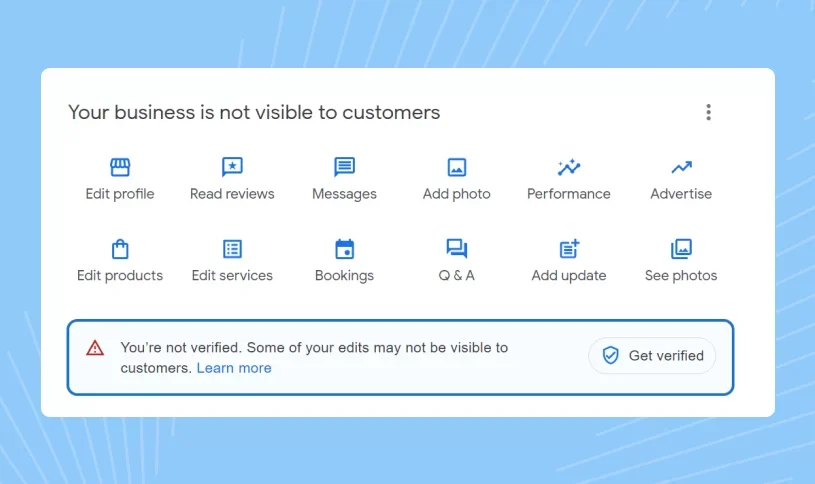
After completing your Google Business Profile verification process, Google reviews your information and confirms your business details. A successful verification helps you manage your profile, improve your Google listing presence, and provide accurate information to customers.
Conclusion
If your Google Business Profile is not verified or you are facing issues with Google Business video verification, understanding the verification requirements can help you complete the process successfully. Whether you need a verification video, live verification, or another available method, following Google's guidelines is important for building a trusted Google listing profile.
Improve your Google Business presence today: Get professional guidance and make your Google Business Profile verification process easier.
Frequently Asked Questions (FAQs)
1. Can you use Google Meet for Google Business verification?
No, Google Meet is not used as the official verification method for a Google Business Profile. Google provides separate verification options, including video verification, phone, email, or other available methods based on business eligibility.
2. Can I use Google Meet for business purposes?
Yes, businesses can use Google Meet for online meetings, team collaboration, customer discussions, presentations, and remote communication. However, it does not verify a Google Business Listing.
3. Can I use Google Meet with a Google account?
Yes, Google Meet works with a Google account. You can join or host meetings using a personal Google account or a business account depending on your requirements.
4. Is Google Meet the same as Google Business Profile live video verification?
No, Google Meet and Google Business Profile live video verification are different. Google Meet is a communication tool, while live verification is designed to confirm business ownership and location details.
5. What is Google Business Profile live video verification?
Google Business Profile live video verification is a process where Google may review your business through a live video connection to confirm that your business exists and operates at the listed location.
6. Why does Google require video verification for some businesses?
Google uses video verification to reduce fake listings and confirm that businesses are legitimate before allowing them to appear publicly on Google Search and Google Maps.
7. What is the difference between Google Meet and Google's live video verification?
Google Meet is created for online meetings, while Google's live video verification is a business authentication process. One focuses on communication, and the other focuses on confirming business authenticity.
8. Can I complete Google Business Profile verification through a normal video call?
No, a normal video call through Google Meet or another platform does not replace the official Google Business Profile verification process. You must use the verification method provided inside your profile.
9. How do I prepare for Google Business Profile video verification?
Prepare by ensuring your business location, signage, equipment, products, and other operational details are visible and match the information listed on your Google Business Profile.
10. Do I need a Google Workspace account for Google Business verification?
No, you do not need a Google Workspace account for Google Business Profile verification. A regular Google account can be used to manage your business profile.
11. Can Google Meet help improve my Google Business Profile ranking?
No, using Google Meet does not directly improve your Google Business Profile ranking. Local ranking depends on factors such as relevance, business information accuracy, reviews, and profile optimization.
12. What happens if my Google Business Profile video verification is rejected?
If your verification video is rejected, Google may provide another opportunity or request additional information. Make sure your next submission clearly proves your business location and ownership.
13. Can I verify multiple businesses using Google Meet?
No, Google Meet cannot be used to verify multiple business locations. Each Google Business Profile must complete the verification method assigned by Google.
14. Is Google Business Profile video verification mandatory for every business?
No, not every business needs video verification. Google selects available verification methods based on business type, location, account history, and other trust signals.
15. Which is better for businesses: Google Meet or Google Business Profile verification?
Both tools serve different purposes. Google Meet helps businesses communicate online, while Google Business Profile verification helps businesses establish trust and visibility on Google Search and Google Maps.
.png)
.png)
.png)
.png)
.png)
.png)
.png)
.png)