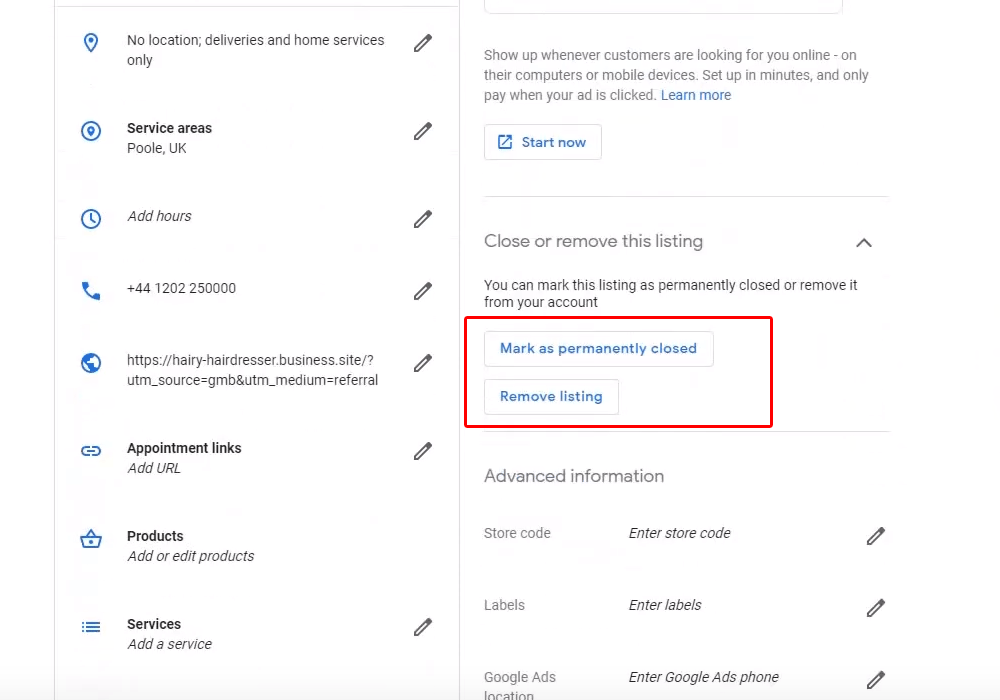
If you are looking for how to delete a business on Google, it is important to understand that deleting a Google Business Profile is different from permanently deleting your business from the real world. Google provides several options depending on whether you want to remove your own access, mark a business as permanently closed, remove a profile you created, or report a business listing that should not appear on Google.
Many business owners search for google my business delete account because they no longer operate a business, have moved to another location, sold the company, created a duplicate profile, or simply no longer want to manage their Google Business Profile. The correct solution depends on the reason for removing the profile.
This guide explains the different ways to remove a business from Google, when you should mark a business as permanently closed, how to remove a Business Profile from your Google Account, what happens to reviews and information, how to deal with duplicate listings, and what you should do before deleting or removing a Google Business Profile.
🚀 Need Help With Google Business Profile Verification?
If your Google Business Profile requires video verification, has failed verification, needs additional verification evidence, or you are dealing with a Service Area Business verification issue, our team can help you understand the verification requirements and prepare your profile correctly. We have successfully assisted 10,000+ businesses worldwide with Google Business Profile verification and suspension-related issues.
What Does It Mean To Delete A Business On Google?
Deleting a business on Google can mean different things depending on what you want to accomplish. A business owner may want to remove a profile from their own account, permanently close a business, remove a duplicate listing, or report an incorrect business profile.
These actions are not always the same. Removing a Business Profile from your account does not necessarily mean that the business information will disappear from Google Search and Google Maps.
If the business is permanently closed, Google may continue to show the profile with a permanently closed status so customers can understand what happened to the business.
Therefore, before deleting anything, you should determine which type of removal is appropriate for your situation.
Why Do Businesses Want To Delete Their Google Business Profile?
Business owners may want to remove or change their Google Business Profile for several reasons. Some businesses close permanently, while others move, change ownership, merge with another company, or discover that multiple profiles were created for the same location.
Common reasons include:
- The business has permanently closed.
- The business has moved to another location.
- The business has been sold to another owner.
- A duplicate Google Business Profile was created.
- The business no longer operates in the listed area.
- The owner no longer wants to manage the profile.
- The listing belongs to a business that never existed at the location.
- The business information is incorrect and needs to be removed or corrected.
Each situation requires a different approach, so simply deleting the profile from your account may not always be the correct solution.
Can You Completely Delete A Business From Google?
Not always. Removing a Business Profile from your Google Account does not necessarily guarantee that the business listing will disappear completely from Google Search or Google Maps.
Google can continue displaying business information when it is considered useful to people searching for the business. For example, a permanently closed business may remain visible with a permanent closure label.
If your goal is to stop managing the profile, you can remove it from your account. If your goal is to tell Google that the business has permanently closed, you should mark the business as permanently closed instead.
Google My Business Delete Account: What Does It Actually Mean?
The phrase google my business delete account is commonly used by business owners searching for a way to remove their old Google listing. However, Google Business Profile is not simply a standalone account that can be deleted like a normal online account.
Your Google Account and your Business Profile are separate concepts. Removing a Business Profile from your account does not mean that your entire Google Account will be deleted.
If you want to stop managing a specific business profile, you should use the Business Profile management options instead of deleting your personal Google Account.
How To Delete A Business On Google Step By Step
If you want to remove a Business Profile that you manage, start by signing in to the Google Account that currently has access to the profile.
Step 1: Sign In To Your Google Account
Sign in to the Google Account that manages the Business Profile you want to remove.
Make sure you are using the correct account, especially if you manage multiple businesses or locations.
Step 2: Find Your Google Business Profile
Search for your business name on Google while signed in to the account that manages the profile.
You can also access your Business Profile management area through Google Search or Google Maps.
Carefully confirm that you have selected the correct business before making any changes.
Step 3: Open Business Profile Settings
Open the management options for your Business Profile and locate the settings related to business information, users, and profile management.
Google can change the wording and placement of profile controls over time, so the exact menu labels may vary depending on your account and Google's current interface.
Step 4: Choose The Appropriate Removal Option
The correct option depends on your situation. If the business has permanently closed, use the permanent closure option rather than simply removing the profile from your account.
If you only want to stop managing the profile, removing your access may be more appropriate.
If the profile is a duplicate, incorrect, or belongs to a different business, reporting or suggesting an edit may be the better solution.
How To Mark A Business Permanently Closed On Google
If your business has permanently stopped operating, marking the profile as permanently closed is generally more appropriate than trying to make the listing disappear completely.
A permanent closure status provides useful information to customers who may search for the business after it has stopped operating.
Before marking the business closed, make sure the closure is actually permanent. If you are temporarily closed, moving to another location, or changing ownership, a different profile management option may be more appropriate.
How To Remove A Google Business Profile From Your Account
There is an important difference between deleting a profile from your account and removing the business information from Google.
If you remove a Business Profile from your account, you may lose management access to that profile. This does not necessarily mean Google will remove every reference to the business from Search or Maps.
Business owners should therefore decide whether they want to:
- Stop managing the profile.
- Mark the business permanently closed.
- Remove a duplicate listing.
- Report an incorrect business.
- Transfer ownership to another person.
Should You Delete Your Google Account To Remove Your Business?
No. Deleting your personal Google Account is not the correct way to remove a Google Business Profile.
Your Google Account can be used for many different Google services. Deleting it can affect email, documents, photos, files, and other services associated with the account.
If your goal is only to remove or stop managing a Business Profile, use the Business Profile management controls instead of deleting your entire Google Account.
🚀 Need Help With Your Google Business Profile?
If your Google Business Profile needs to be removed, transferred, verified, recovered, or corrected, our team can help you understand the appropriate Google Business Profile process. We assist businesses with profile verification, ownership issues, profile optimization, service-area profiles, and suspended Business Profiles.
How To Delete A Duplicate Business On Google
Duplicate Google Business Profiles are a common problem for businesses that have accidentally created more than one listing for the same location.
If two profiles represent the same business and location, creating or maintaining both can create confusion for customers and make business profile management more difficult.
Before deleting anything, identify which profile is the legitimate listing and determine whether the duplicate should be removed, merged, or otherwise reported through Google's available processes.
Do not automatically delete the profile with fewer reviews or less information without first confirming which listing should remain associated with the business.
What To Do If Your Business Has Moved
If your business has moved to a new address, deleting the old Business Profile may not be the correct solution.
A business that moves may need to update its existing profile rather than create a completely new listing. The correct approach depends on the business, location, and circumstances surrounding the move.
Make sure your business information is accurate before making major profile changes.
What To Do If Your Business Was Sold
If you sold your business, you generally should not simply delete the Business Profile if the business continues operating.
Instead, ownership should be transferred to the new authorized business owner when appropriate.
Google provides owner and manager access controls that allow businesses to manage different users and transfer ownership responsibilities.
If you are transferring a profile to a new owner, review our guide on how to claim a business on Google for information about ownership and access.
Can You Delete A Business From Google Maps?
Whether a business can be removed completely from Google Maps depends on why the listing exists and whether it represents a legitimate business.
If the business permanently closed, Google may continue showing the location with a permanent closure status.
If the listing is incorrect, fraudulent, duplicated, or represents a business that does not exist at that location, you can use Google's available reporting and editing options.
Simply removing your management access does not necessarily remove a legitimate business listing from Google Maps.
How To Remove A Business From Google Search
Google Search and Google Maps use business information from different sources, so removing a Business Profile from your account does not guarantee that every mention of the business will disappear from Google's search results.
If the business has permanently closed, the appropriate approach is generally to communicate the closure through the Business Profile rather than attempting to erase every historical reference to the company.
Search results can also contain third-party websites, directories, social media pages, and other sources. Removing a Business Profile does not automatically remove information published on those external websites.
Can Reviews Be Deleted When You Remove A Business?
Removing a Business Profile from your account does not mean that all customer reviews will automatically disappear.
Reviews are associated with the business profile and Google may continue displaying business information, including historical information, depending on the profile's status.
If a review violates Google's content policies, it can be reported through the appropriate review reporting process. However, a business owner cannot simply delete legitimate customer reviews because they no longer want the profile.
What Happens To Photos After A Business Is Closed?
Business photos and other information may remain associated with a Business Profile depending on its status and Google's systems.
Permanently closing a business does not necessarily mean that every piece of historical information is immediately removed from Google.
If specific content violates Google's policies, it can be reported separately.
How To Remove Your Access Without Removing The Business
Sometimes a business owner does not want to delete the business listing at all. They simply want to stop managing it.
For example, if you sold the company, transferred management, or no longer work with the business, transferring ownership or removing your access may be more appropriate than deleting the profile.
This approach allows the business to continue maintaining its Google presence under the control of the new authorized owner.
How To Remove An Employee From Your Google Business Profile
If an employee leaves your company, you may not need to delete the Business Profile. Instead, review the users who have access and remove anyone who should no longer manage the listing.
Regularly reviewing account access is an important part of protecting your Google Business Profile.
- Review current owners.
- Review current managers.
- Remove former employees.
- Remove outdated agency access.
- Keep ownership under authorized business control.
What If Someone Else Created Your Business Profile?
You do not necessarily need to delete a profile because someone else created it.
If the profile accurately represents your business, the better approach is usually to claim it or request ownership rather than creating a second listing.
Read our how to claim a business on Google guide if you need help understanding the ownership process.
What If You Cannot Access Your Google Business Profile?
If you cannot access the profile because another person controls it, you may need to request ownership instead of deleting the listing.
If the profile is suspended or restricted, deletion is also not necessarily the appropriate solution. You should first determine why the profile is unavailable and follow the relevant Google process.
For suspended profiles, you can review our Google Business Profile suspension service.
Should You Delete A Suspended Google Business Profile?
Deleting a suspended profile is generally not a shortcut for resolving a suspension.
If your legitimate business profile has been suspended, the appropriate approach is to understand the reason for the restriction and use Google's available reinstatement or appeal process.
Creating a replacement profile simply to bypass a suspension can create additional problems for the business.
How To Delete An Unwanted Google Business Profile
If you have a profile that you no longer need, first determine why it is unwanted.
Ask yourself:
- Has the business permanently closed?
- Was the profile created accidentally?
- Is the profile a duplicate?
- Did the business move?
- Was the business sold?
- Does the profile represent a different business?
- Do you simply want to stop managing the profile?
The answer determines the correct next step.
Difference Between Deleting, Closing, And Removing A Business Profile
| Action | When It May Be Appropriate |
|---|---|
| Remove From Your Account | When you no longer want to manage the profile from your Google Account. |
| Mark Permanently Closed | When the business has permanently stopped operating. |
| Transfer Ownership | When another authorized person is taking over the business. |
| Report Duplicate | When another listing represents the same business and location. |
| Suggest An Edit | When information on Google is incorrect and needs correction. |
| Request Ownership | When another person controls a legitimate Business Profile representing your business. |
Common Mistakes When Trying To Delete A Business On Google
Business owners sometimes take the wrong approach because they assume that deleting their Google Business Profile will automatically remove all business information from Google.
Common mistakes include:
- Deleting the entire Google Account instead of managing the Business Profile.
- Creating a new profile instead of resolving an ownership issue.
- Removing a profile that should have been marked permanently closed.
- Creating duplicate listings after moving the business.
- Assuming that removing account access removes the listing from Google Maps.
- Trying to delete a legitimate business profile because it is temporarily unavailable.
- Ignoring ownership and manager permissions.
How To Prepare Before Removing Your Google Business Profile
Before making permanent changes, review the profile carefully and save any information that your business may need later.
- Record important business information.
- Review current owners and managers.
- Check whether the business is actually closed.
- Confirm whether the listing is a duplicate.
- Check whether another owner needs to receive access.
- Review important customer information and profile history.
- Make sure you are working on the correct Business Profile.
How To Handle A Business That Is Temporarily Closed
Temporary closure is different from permanent closure. If your business is temporarily unavailable, you should not necessarily remove the Business Profile.
Depending on your circumstances, updating the business information and communicating the temporary closure may be more appropriate.
Removing a profile because of a short-term closure can make it harder for customers to find accurate information about when your business will reopen.
How Business Profile Removal Affects Local Search
A Google Business Profile plays an important role in how customers discover local businesses through Google Search and Google Maps.
Removing or closing a profile can change how customers see the business in local search. If the business is still operating, deleting or removing the profile unnecessarily can reduce the availability of important business information.
Therefore, business owners should only remove or close a profile when the action accurately reflects the current status of the business.
Can A Business Be Added Again After Deleting It?
Depending on the circumstances, a business may be able to establish a Business Profile again if it remains eligible. However, repeatedly deleting and recreating profiles is not a good way to manage a business listing.
If the business is still operating and the profile was removed accidentally, first determine whether the existing profile can be recovered or managed rather than immediately creating another listing.
How To Manage Multiple Google Business Profiles Before Deleting One
Businesses with multiple locations should be especially careful before removing a profile. A company may manage several legitimate Business Profiles, and deleting the wrong location can affect customers searching for that branch.
Before removing a location, verify:
- The exact business name.
- The location address.
- The profile URL.
- The location's current operating status.
- The ownership information.
- Whether the profile is a legitimate branch or duplicate.
If you manage several locations, careful organization is especially important when making changes to your Google Business Profile network.
What To Do After Removing Or Closing Your Business Profile
After completing the appropriate removal or closure action, search for the business again on Google and Google Maps to check how the information appears.
Keep in mind that Google may take time to update information across its systems, and third-party websites may continue showing old business information.
If the business has permanently closed, check important online directories, social media profiles, websites, and other platforms separately so that customers receive consistent information.
Google Business Profile Removal Checklist
| Checklist Item | What To Do |
|---|---|
| Confirm Business Status | Determine whether the business is open, temporarily closed, moved, sold, or permanently closed. |
| Check Profile Ownership | Confirm who currently owns or manages the Business Profile. |
| Check For Duplicates | Make sure the profile is not one of several listings for the same location. |
| Choose The Correct Action | Decide whether to close, transfer, remove access, or report the listing. |
| Review Business Information | Save important information before making major profile changes. |
| Check Google Maps | Search for the business after making the change to confirm the current status. |
| Update Other Platforms | Update your website, directories, social profiles, and other business listings if necessary. |
Google Business Profile Removal Features
| Profile Action | Purpose |
|---|---|
| Remove Profile Management | Stops a Google Account from managing the Business Profile without necessarily removing all public information. |
| Permanent Closure | Indicates that a business has permanently stopped operating. |
| Ownership Transfer | Moves management responsibility to another authorized business representative. |
| Duplicate Reporting | Helps address profiles that incorrectly duplicate another business listing. |
| Information Correction | Allows inaccurate business information to be corrected through available Google tools. |
Frequently Asked Questions (FAQs)
1. How do I delete a business on Google?
The correct process depends on why you want to remove the business. If the business permanently closed, mark it as permanently closed. If you only want to stop managing the profile, remove your management access instead.
2. Can I completely remove my business from Google?
Removing a Business Profile from your account does not necessarily remove all business information from Google Search or Google Maps. Google may continue displaying information about a business, particularly when it is useful to searchers.
3. What does Google My Business delete account mean?
The phrase google my business delete account usually refers to removing or stopping management of a Google Business Profile. It does not mean that you should delete your entire Google Account.
4. Should I delete my Google Account to delete my business?
No. Deleting your Google Account can affect other Google services. If you only want to remove a Business Profile, use the Business Profile management options.
5. How do I mark my business permanently closed?
Open the Business Profile you manage and use the available business status or closure option. Permanent closure should only be used when the business has actually stopped operating permanently.
6. Can I delete a duplicate Google Business Profile?
If a duplicate profile represents the same business and location, identify the legitimate listing and use the appropriate Google process for handling the duplicate rather than deleting the wrong profile.
7. What happens to my reviews if I remove my business profile?
Removing your management access does not automatically mean that customer reviews will disappear. Google may continue displaying historical business information depending on the profile status.
8. Can I remove a business from Google Maps?
The appropriate process depends on whether the business is closed, duplicated, incorrect, or still operating. A legitimate permanently closed business may continue appearing with a closure status.
9. Can I delete my business if I sold it?
If the business continues operating under new ownership, transferring ownership is generally more appropriate than deleting the Business Profile.
10. What should I do if a former employee controls my profile?
Ask the former employee to transfer ownership or remove their access. If they cannot be contacted, use the appropriate Google ownership-request process.
11. Can I delete a suspended Google Business Profile?
A suspension should generally be addressed through Google's reinstatement or appeal process. Creating or deleting profiles to bypass a suspension can create additional problems.
12. What happens if I remove a Business Profile from my account?
Removing the profile from your account can remove your management access, but it does not necessarily mean that Google will immediately remove the public business information.
13. Can I add my business again after removing it?
If the business remains eligible, it may be possible to establish or recover a Business Profile again. However, it is better to resolve an existing profile issue instead of repeatedly creating duplicate listings.
14. Should I delete my profile if my business moved?
Not necessarily. If the same business moved to a new location, updating the existing profile may be more appropriate than deleting it and creating a new listing.
15. Can I remove a business that does not belong to me?
If a listing does not represent the business it claims to represent, use Google's available reporting or editing options rather than attempting to take ownership of a business that you do not operate.
Conclusion
Understanding how to delete a business on Google is important because there is no single removal option that applies to every business situation. A permanently closed business, a duplicate listing, a sold business, and a profile that you simply no longer want to manage all require different actions.
If you are searching for google my business delete account, remember that you do not need to delete your entire Google Account just because you want to stop managing a Business Profile. Instead, identify the current status of the business and choose the appropriate profile management option.
Before removing or closing a profile, confirm the correct business listing, review ownership and access, check for duplicate profiles, and decide whether the business is permanently closed or simply changing ownership. Taking the correct approach helps prevent unnecessary profile problems and keeps business information more accurate for customers searching on Google.
.png)
.png)
.png)
.png)
.png)
.png)
.png)
.png)